A route segment is a folder within Next.js's app directory that represents one portion of the URL hierarchy. Adding page.js to that folder makes the route publicly accessible, so folders and URLs mirror each other: app/blog/page.js serves /blog. section 2.8.1
Route segments can also organize rendered content. A layout.js file inside a segment defines UI shared by that segment and its descendants, while nested layouts inherit from the root layout and can add section-specific elements. section 2.8.5
Use route segments to structure pages and shared application chrome:
- Create app/page.js for the index page at /. section 2.8.1
- Create app/blog/page.js for /blog. section 2.8.1
- Create app/blog/[post]/page.js for dynamic post URLs; Next.js exposes the captured value through the params prop. section 2.8.1
- Place layout.js inside a segment to add shared elements such as blog sidebars or featured content. section 2.8.5
Figure 2.9 File-based routing in Next.js. The root page.js in the app corresponds to the index page (/). The blog page.js in the blog folder corresponds to the blog path (/blog). Finally, the route segment that corresponds to individual articles (wrapped in brackets [ ]) corresponds to the blog post path (/blog/hello).
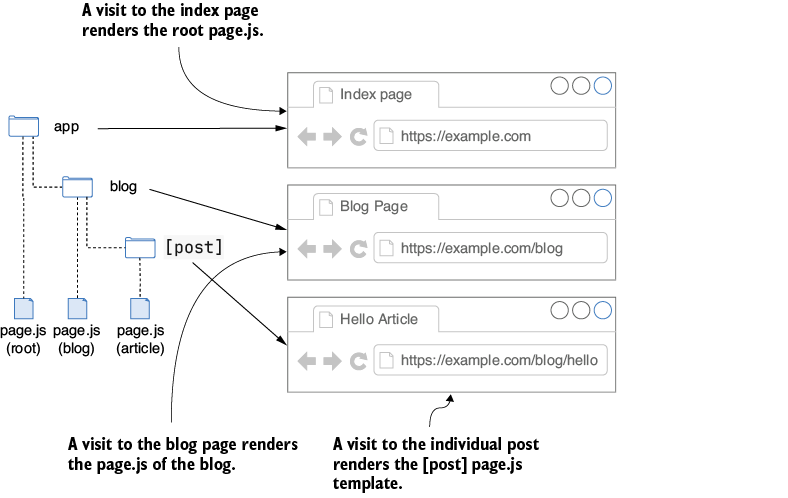
Compare folders, page.js files, static paths, and bracketed dynamic segments in a route tree. section 2.8.1
Figure 2.10 This diagram shows nested layouts in Next.js. The root layout wraps all content, while the blog layout adds elements specific to the blog section. Individual blog posts are inherited from both.
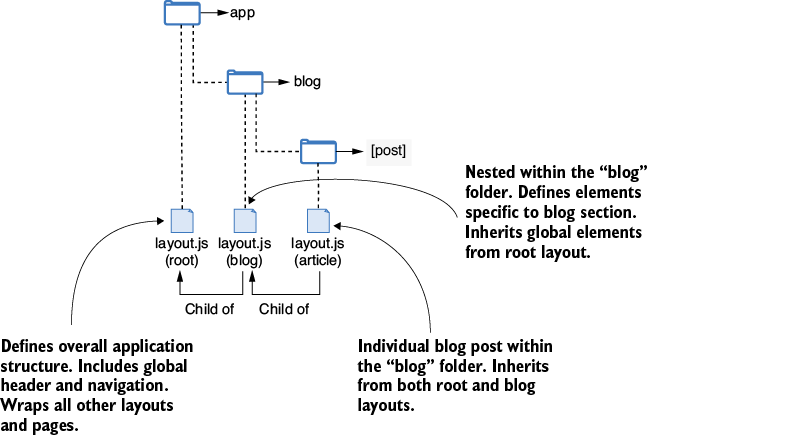
Inspect how a root layout wraps a section layout and individual pages. section 2.8.5
Chat and blog structure
An app directory can contain a chat route group and a blog segment. The blog page serves /blog, while app/blog/[post]/page.js can render posts such as /blog/hello using the captured post value. A blog layout can add section-specific UI beneath the global root layout. section 2.8.1 section 2.8.5
