A routed port is a physical multilayer-switch port configured to function like a router interface. It provides Layer 3 connectivity between the switch’s internal networks and external networks. section 12.4.2
Configure and use a routed port in three steps:
- Enter interface configuration mode and apply no switchport to convert the physical port from a switchport into a routed port. section 12.4.2
- Assign an IP address as you would on a router interface. The switch then adds connected and local routes for that interface. section 12.4.2
- Add routes to external destinations; a static default route or routes learned through a dynamic routing protocol can provide that reachability. section 12.4.2 section 12.5
SW1 connects to R1
SW1(config)# interface g0/1 SW1(config-if)# no switchport SW1(config-if)# ip address 172.16.1.193 255.255.255.252 SW1(config)# ip route 0.0.0.0 0.0.0.0 172.16.1.194 Here, G0/1 becomes a routed port, receives an IP address, and reaches external destinations through R1 at 172.16.1.194. The /30 link produces connected and local routes for G0/1. section 12.4.2
Figure 12.12 SW1, a multilayer switch, uses a routed port (G0/1) to provide connectivity to external networks (via R1, in this case). Like a router interface, SW1 G0/1 is configured with an IP address: 172.16.1.193.
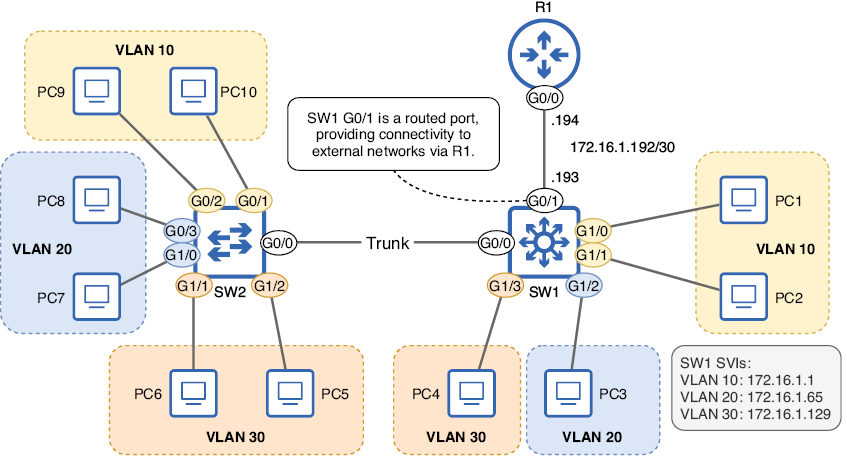
Use the topology to distinguish a routed physical link from VLAN-based internal routing. section 12.4.2
