liveBook · Manning

Row count condition

As explained in 100 SQL Server Mistakes and How to Avoid Them

A row count condition is a test assertion that verifies the number of rows returned by a result set.

Mistake #1: treating returned values as sufficient. A row count condition checks that a result set contains the expected number of rows, catching missing or extra results that scalar checks can overlook. section 7.5

Campaign test

A stored-procedure unit test uses CampaignID 27587, Budget 10, and Detailed set to 1. Alongside scalar checks, it requires the second result set to return exactly 42 rows. Run the test, inspect its status, and change an expected value to observe a failure; remember that a failing test may contain the error. section 7.5

Apply the condition with this checklist:

  • Add a Row Count condition to the test and configure the expected result-set count. section 7.5
  • Run all tests from Test Explorer, then drill into the test for granular status information. section 7.5
  • Verify the test itself when a failure appears; the production code may be correct. section 7.5
Figure 7.6 Creating a unit test
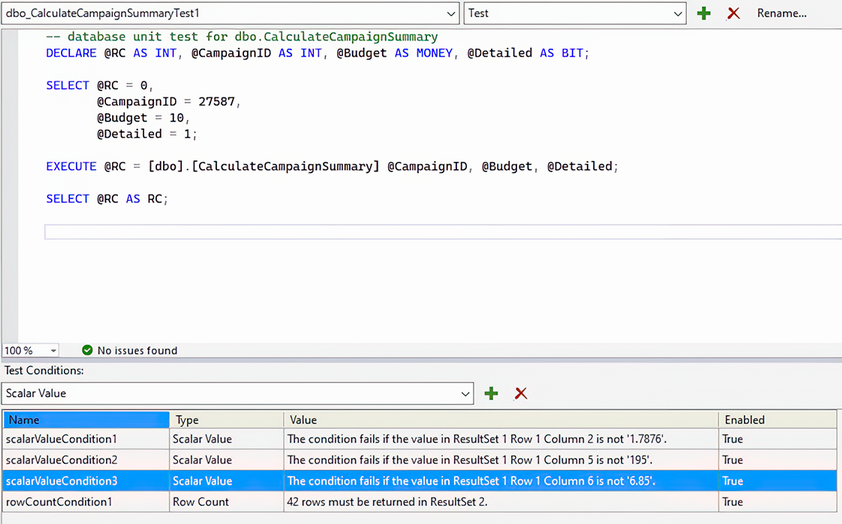
Use the unit-test layout to locate test code, conditions, and configuration controls. section 7.5

How 100 SQL Server Mistakes and How to Avoid Them covers it

How deep it goes
Shows configuration and execution for one expected result-set count, but does not detail the condition’s internal implementation.
Examples
Uses a stored-procedure test with CampaignID 27587, Budget 10, Detailed 1, and an expected 42-row second result set.
What it assumes
Assumes a T-SQL code module and basic test-condition configuration, while demonstrating the assertion setup.
What you can do after
Evaluate result sets in a unit test and inspect failures through Test Explorer.
How it connects
Connects row counts with unit testing, result sets, stored procedures, scalar value conditions, and Test Explorer.

This explainer was generated by Manning's knowledge graph from the text of 100 SQL Server Mistakes and How to Avoid Them. The section links point to the parts of the book it draws on.