A Snowflake row access policy controls which rows a query returns. Its Boolean body evaluates the executing role and values from one or more mapped row columns; rows are returned only when the policy evaluates to TRUE. Policies are schema objects and can be attached to tables or views. section 10.2
Use row-level filtering when multiple business units, regions, or similar groups share database objects but must see only their own records. It complements role-based access control: roles receive object access, while the policy restricts the rows visible through that access. section 10.0 section 10.4
Implement a role-based policy incrementally:
- Create a governance schema, such as DG, and grant the implementing role CREATE ROW ACCESS POLICY on that schema plus the account-level APPLY ROW ACCESS POLICY privilege. section 10.2
- Create functional roles for the permitted groups and grant each the access role that allows reads of the target schema. section 10.2
- Define the policy with a column argument and CASE logic. Test session roles with IS_ROLE_IN_SESSION, compare the row value to its allowed group, and return FALSE for all other cases. section 10.2
- Attach the policy to the target view or table on the matching column, then query under each functional role to verify the returned rows. section 10.2
Business-unit employee view
A policy on EMPLOYEE(DEPARTMENT) allows DATA_ENGINEER to see all rows, DATA_ANALYST_BREAD to see Bread rows, and DATA_ANALYST_PASTRY to see Pastry rows. Both analyst roles can read the RPT schema through BAKERY_READ, but their query results differ by department. section 10.2
Figure 10.2 Functional roles DATA_ANALYST_BREAD and DATA_ANALYST_PASTRY are granted the BAKERY_READ access role, which allows them to read data in the RPT schema. A row access policy is applied to the EMPLOYEE view in the RPT schema, filtering rows based on the user’s functional role.
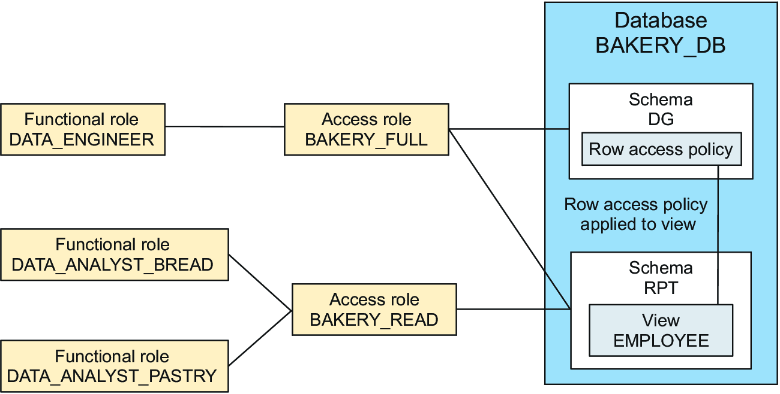
The role diagram separates schema read access from policy-driven row filtering, showing why both access roles and a row access policy are needed. section 10.2
Choose a centralized model when governance officers define and apply policies, a decentralized model when teams do both, or a hybrid model when governance defines policies and teams apply them. Keep policy ownership and application responsibilities explicit. section 10.2
