SAFE Stack is an F#-first web development stack for building both server and browser applications while keeping F# across the full application. It combines .NET and JavaScript ecosystem tools, enabling standards-compliant, rich web applications without giving up immutable data or expression-oriented code. section 13.5 section 13.5.1
Figure 13.12 The SAFE Stack is a collection of different technologies bundled together to allow writing standards-compliant, rich web applications entirely in F#. The left-hand side of this figure represents the server side of the stack; the right-hand side represents the client side, which typically runs in the browser as a so-called single-page application.
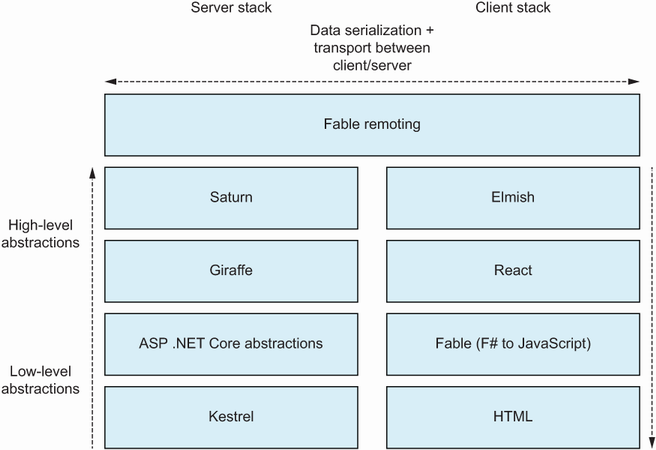
The stack separates server-side technologies from client-side technologies, with the browser commonly running a single-page application. section 13.5.1
The main pieces give common application tasks an F#-oriented shape:
- Saturn extends Giraffe with quicker abstractions for common server tasks. section 13.5.1
- Fable Remoting provides type-safe, RPC-style communication between browser and server over HTTP. section 13.5.1
- Elmish supports the Model-View-Update pattern for structuring F# user interfaces. section 13.5.1
- React supplies the user-interface library underneath the F# client experience. section 13.5.1
Create and run a starter application
Install Node.js v16 and npm v8, then install the SAFE template. Create a directory, enter it, run `dotnet new SAFE`, restore the tools with `dotnet tool restore`, and start the application with `dotnet run`. The generated application provides a to-do interface at `http://localhost:8080`, including adding items and real-time validation. Its in-memory list survives browser refreshes but resets when the application restarts. Use `--minimal` when a lighter template is preferable. section 13.5.2
