SaveChangesAsync is the asynchronous DbContext operation that sends tracked changes to the database. After creating an entity and adding it with _context.Add(entity), call SaveChangesAsync to execute the required SQL INSERT statements. The method also updates autogenerated IDs after a successful insert. section 12.4.1
Use SaveChangesAsync in the following persistence workflows:
- Create: construct the entity graph, add it to the context, then save. EF Core links related Recipe and Ingredient entities and generates their INSERT statements. section 12.4.1
- Update: load a tracked entity, change its properties, then save. EF Core compares the entity with its tracking snapshot and updates only changed columns. section 12.4.4
- Delete or soft-delete: remove an entity or set an IsDeleted flag, then save. Soft deletion is often safer and easier to implement. section 12.4.4 section 12.6
Updating a recipe
public async Task UpdateRecipe(UpdateRecipeCommand cmd)\n{\n var recipe = await _context.Recipes.FindAsync(cmd.Id);\n if (recipe is null) throw new Exception("Unable to find the recipe");\n\n recipe.Name = cmd.Name;\n await _context.SaveChangesAsync();\n}\n\nFindAsync loads the entity into the DbContext's tracked state. After the property changes, SaveChangesAsync generates the database UPDATE. Handle database exceptions so users do not receive an unhelpful error page. section 12.4.4
Figure 12.14 Updating an entity involves three steps: read the entity using EF Core, update the properties of the entity, and call SaveChangesAsync() on the DbContext to generate the SQL to update the correct rows in the database.
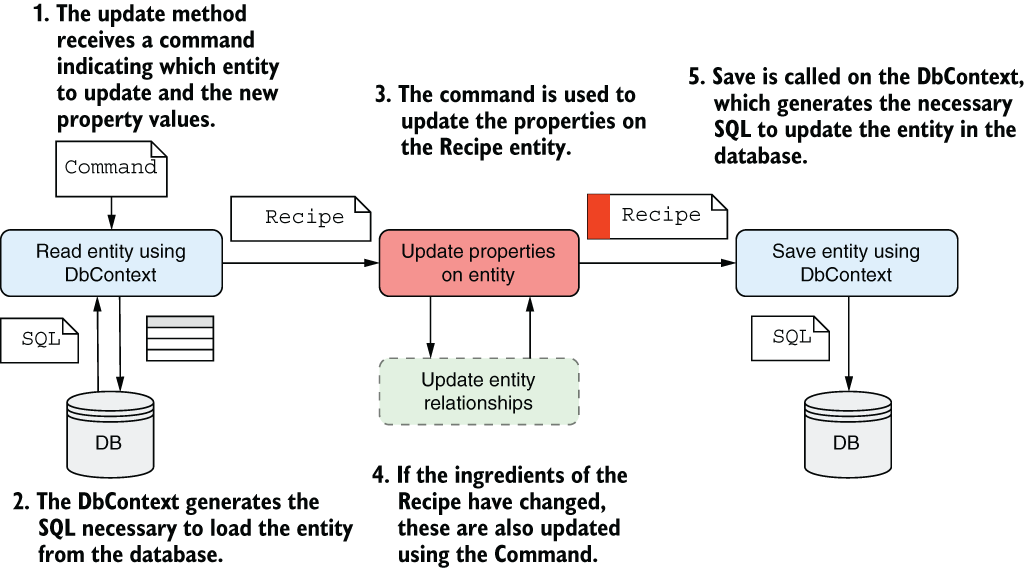
The figure summarizes the update sequence: read the entity, modify its properties, and call SaveChangesAsync to generate SQL for the affected rows. section 12.4.4
