A scalar value condition is a unit-test assertion that compares one returned value with an expected value. Configure each condition against a result-set column, then investigate whether a failure comes from the code or from an incorrect expectation. section 7.5
A practical SQL Server unit test can use scalar conditions as follows:
- Execute the code module with the required parameters in the test script. section 7.5
- Add a scalar value condition and configure its column and expected value through the properties window. section 7.5
- Use several scalar conditions when multiple returned values must be checked, and combine them with a row count condition when result-set size also matters. section 7.5
- Run the test in Test Explorer and inspect granular results; change an expected value deliberately to observe a failure. section 7.5
Checking a stored procedure result
A test executes a stored procedure with CampaignID 27587, Budget 10, and Detailed set to 1. Scalar conditions then require Column 2 to equal 1.7876, Column 5 to equal 195, and Column 6 to equal 6.85; a separate row count condition requires 42 rows in the second result set. section 7.5
Figure 7.6 Creating a unit test
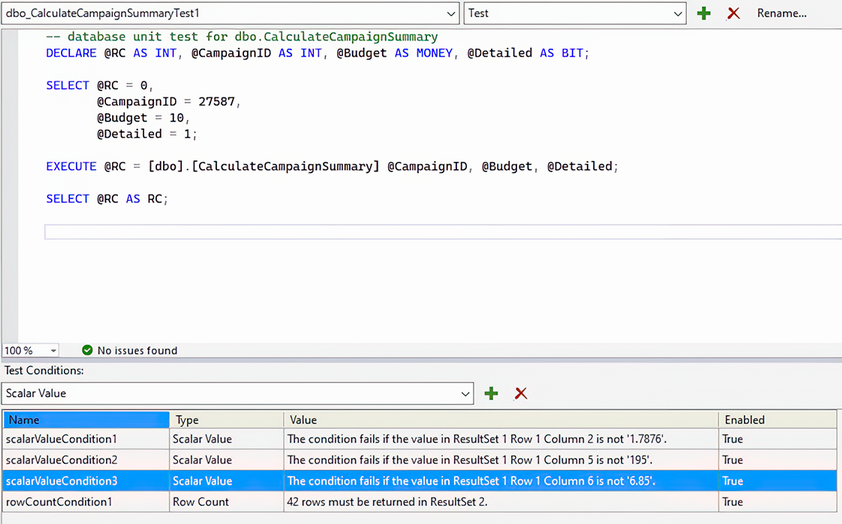
Use the unit-test layout to locate test scripts, condition types, and configured expected values. section 7.5
