A scenario automation tool turns a human-readable scenario into an executable test. It reads the scenario text and invokes automation code written by the team; the tool does not supply the behavior-specific automation logic. section 1.3.4 section 12.3
Teams can use the tools to:
- Run one scenario while developing its automation and the production behavior it describes. section 12.3
- Run a selected subset, such as scenarios filtered by tags, or run all scenarios for broader feedback. section 12.3
- Execute each scenario-outline example row as a separate data point. section 12.3
A typical working loop starts with a failing scenario, adds or updates automation code, and implements the required application behavior until the scenario passes. The team can then refactor and continue with another scenario. section 1.3.4
Figure 1.3 The BDD cycle is the outer loop – write a failing scenario, get the scenario to pass, then refactor. We enter the inner, TDD cycle to implement the code needed to move from a failing scenario to a passing scenario.
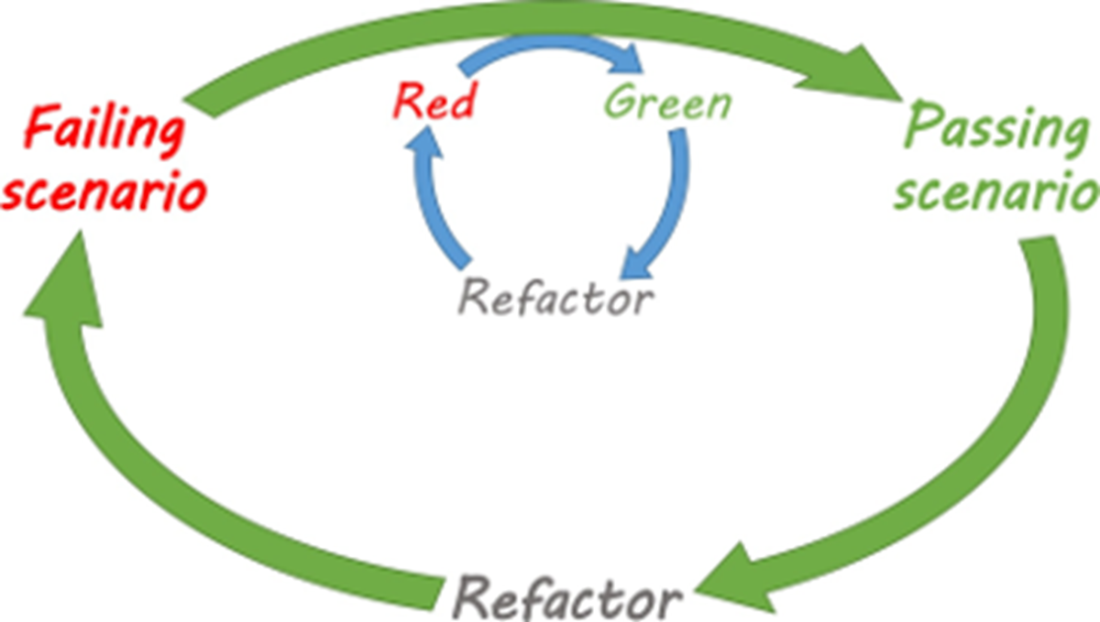
The diagram shows the scenario-driven outer loop and the inner TDD cycle used to implement code. section 1.3.4
Execution depends on the programming language and platform: some tools run independently, while others integrate with the platform’s test environment. section 12.3
