A schedule expression defines when a recurring task is triggered. In AWS Lambda, a scheduled event rule can invoke a function periodically, much like a cron job. The simplest form is rate(value unit), where the value is a positive integer and the unit is minute, minutes, hour, hours, day, or days. section 6.2.1 section 6.5
Use a rate expression when the task repeats at a regular interval:
- rate(5 minutes) triggers a website health check every five minutes. section 6.2.1
- rate(1 hour) triggers the task every hour, while day-based forms support daily repetition. section 6.2.1
- Frequencies shorter than one minute are not supported. section 6.2.1
- Use cron syntax for calendar-based schedules, such as 08:00 UTC every day or 16:00 UTC on weekdays. section 6.2.1
Scheduling a Lambda health check
Create a scheduled event rule, choose Schedule Expression as its rule type, and enter rate(5 minutes). Attach the rule to a Lambda function such as a website health check. For a fixed clock time, use cron(0 8 * * ? *) for 08:00 UTC daily or cron(0 16 ? * MON-FRI *) for 16:00 UTC on weekdays. section 6.2.1
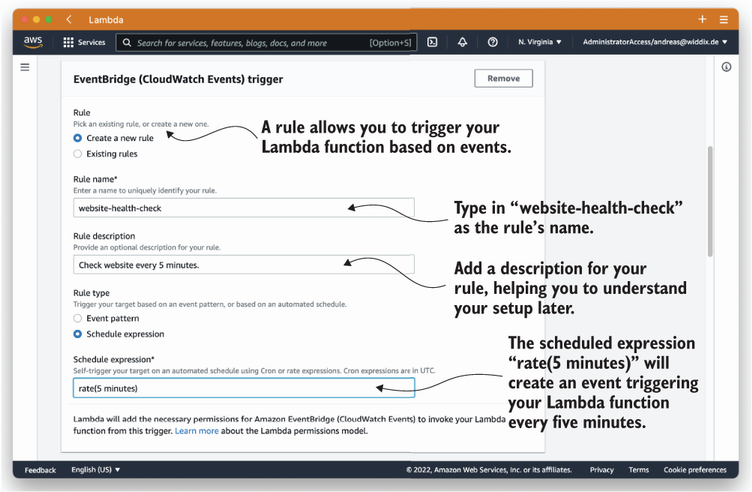
View the scheduled-event configuration for a Lambda function running every five minutes. section 6.2.1
cron($minutes $hours $dayOfMonth $month $dayOfWeek $year)

 # Invoke a Lambda function at 08:00am (UTC) everyday
 cron(0 8 * * ? *)

 # Invoke a Lambda function at 04:00pm (UTC) every Monday to Friday
 cron(0 16 ? * MON-FRI *)
Inspect the cron field order and working daily and weekday schedules. section 6.2.1
