liveBook · Manning

Scheduled run

As explained in Claude at Work

A scheduled run is one execution of a task initiated by its schedule.

A scheduled run is one execution of a task initiated by its schedule. In Claude Desktop, schedules are skills backed by a SKILL.md file; you can edit the steps or run one on demand. section 4.8

A practical setup and review loop:

  • Open the schedule in Claude Desktop and use Run now to test it. section 4.8
  • Approve connector permissions in advance if the task needs them, then inspect the run output. section 4.8
  • Check destinations and other details: a repo digest run posted to a similarly named Slack channel when its intended channel did not exist. section 4.8
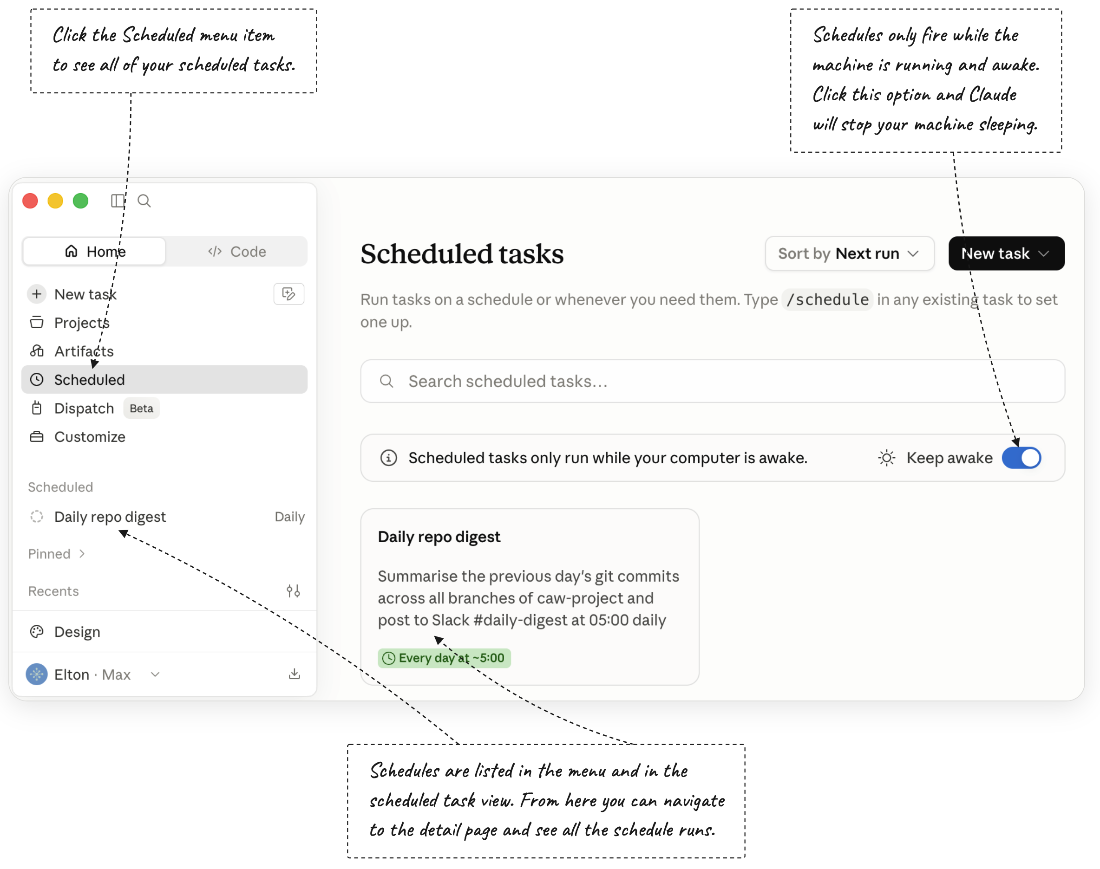
Figure 4.4 The scheduled tasks view in Claude Desktop, where you can navigate to schedules and then edit or run them on demand.
CH04 F04 Stoneman

Use the scheduled tasks view to find schedules, edit them, or run one on demand. section 4.8

How Claude at Work covers it

How deep it goes
Shows how to edit a schedule, run it on demand, approve connector permissions, and inspect output.
Examples
Uses a daily repository digest that posts to Slack and a scheduled email-and-calendar summary.
What you can do after
Operate a schedule in Claude Desktop by editing its steps, testing a run, and approving connector access.
How it connects
Connects scheduled runs to skills, connectors, Claude Desktop, and Slack.

Related concepts

This explainer was generated by Manning's knowledge graph from the text of Claude at Work. The section links point to the parts of the book it draws on.