When Bob edits a document, Cedar first asks whether the request’s principal, action, and resource fit a policy’s scope. Scope matching selects applicable policies before any contextual conditions run; without a scope match, the request is implicitly denied. section 7.3.2 section 7.3.1
Scope matching follows a distinct sequence:
- Collect relevant policies from sources such as organization-wide security groups and application-specific policy stores. section 7.3.2
- Compare the request’s principal, action, and resource with each policy’s corresponding scope. section 7.3.2
- Pass only scoped policies to condition evaluation; when conditions must be true, while unless conditions must be false. section 7.3.2
- Combine the effects of policies that pass both stages into the final authorization decision. section 7.3.2
Bob edits a document
A request identifies Bob as Employee::"bob", the edit action, Document::"doc456", and a managed device. A policy scoped to every employee, view or edit actions, and every document matches the request. Cedar then checks that Bob owns the document and that the device is managed. section 7.3.1
Figure 7.2 Mapping an access request to a policy. Each component of the request (left) is matched against the corresponding part of the policy (right). Scope is matched directly; conditions are evaluated by using attributes and context.
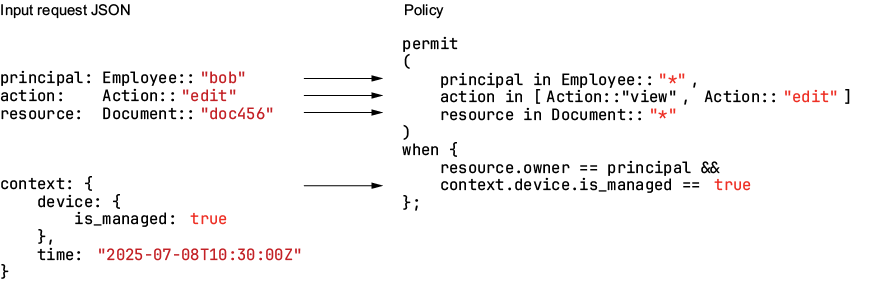
Map each request component directly to its policy scope, then evaluate attributes and contextual values in the conditions. section 7.3.1
