Repeating questions after an automated conversation frustrates users and slows the receiving agent. A screen pop prevents this by displaying concise, contextual conversation information when a human agent takes over. section 12.1.2
An effective screen pop combines:
- Structured metadata such as member, provider, and claim IDs. section 12.1.2
- A one- or two-sentence free-text summary that preserves the conversation’s overall context. section 12.1.2
- Backend links that let agents open related member records, ID cards, or claims. section 12.1.2
Insurance claim handoff
After an automated assistant verifies a member and retrieves a claim, the agent sees the member ID, provider ID, claim ID, payment status, and a short summary. The agent can open the claim instead of asking the user to repeat the conversation. section 12.1.2
Figure 12.4 When a summary is integrated with contact center software, the human agent can have a wealth of information at their fingertips. When an insurance agent clicks on the member ID in their software, they could get additional details on that member.
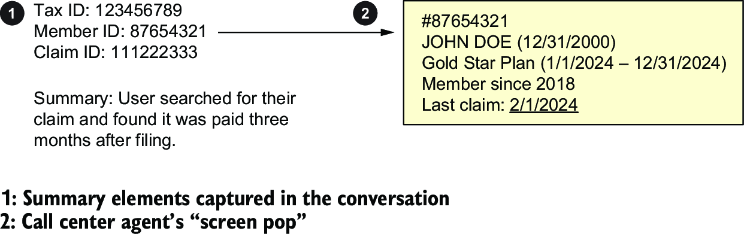
An integrated screen pop shows how highlighted conversation data can lead to additional member information. section 12.1.2
