A secret is confidential data that automation needs but scripts must not contain: passwords, API keys, SSH keys, certificates, tokens, usernames, and connection values can all expose useful pieces of an attack path. Store these values in protected vaults and retrieve them when the automation runs instead of embedding them in script files. section 4.1.1
Choose storage by balancing access and portability. A SecretStore vault is tied to one user and machine, while a movable KeePass database can support reuse but needs careful protection. SecretManagement can register multiple backend vaults, allowing one automation to isolate SQL connection data while sharing email credentials across automations. section 4.3.4 section 4.4.1
Add and retrieve secrets through explicit names and vaults:
- Use Set-Secret with a Name, Vault, and secret object. Supported values include String, SecureString, PSCredential, Hashtable, and byte arrays; an existing name is overwritten unless NoClobber is used. section 4.3.5
- Keep the sensitive value in the Secret parameter; use descriptive names for lookup. Give related values a shared prefix, then append suffixes such as Credential or Key. section 4.3.5
- Use Get-Secret with both Name and Vault. Unique names and an explicit vault avoid ambiguous matches; without Vault, the module searches registered vaults beginning with the default. section 4.4.1
- Request -AsPlainText only where a string value is required, because string secrets otherwise return as SecureString objects. section 4.4.1
SQL health check with separate secrets
Retrieve a PSCredential and SQL Server name from the SQLHealthCheck vault, passing the server name as plain text to Invoke-DbaDiagnosticQuery. Retrieve a SendGrid sender address and API credential from SmtpKeePass, then send a test email with Send-EmailMessage. Test each connection independently before combining them in the health-check automation. section 4.3.5 section 4.4.1
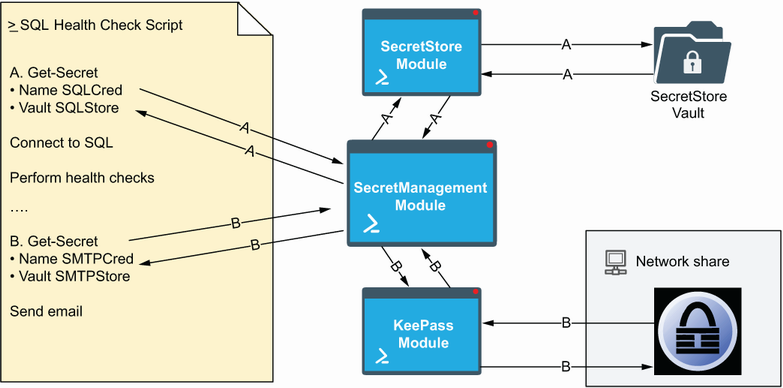
Compare the split-vault arrangement: shared SendGrid credentials can be updated for multiple automations, while SQL connection secrets remain isolated in a separate vault. section 4.3.4


