SecureStorage saves encrypted key-value data in a .NET MAUI app. It resembles Preferences in its key-value model, but encrypts each stored value with a cryptographic key obtained and managed by the operating system. section 3.3
The API abstracts each platform’s encrypted-storage service: KeyChain on iOS and macOS, and Keystore on Android. The OS-managed key is available only to the app; hardware-backed encryption may be used without changing application code. section 3.3
Choose storage by the sensitivity and shape of the data:
- Use Preferences for ordinary key-value configuration data. section 3.3
- Use SecureStorage when a key-value value must be stored encrypted. section 3.3
- Use the file system or SQLite for larger or more complex local data; SecureStorage can protect a database encryption key. section 3.5 section 3.3
Protecting a SQLite database key
A MauiTodo database first reads the value stored under dbKey with SecureStorage.GetAsync. If no value exists, it creates a GUID string, stores it with SecureStorage.SetAsync, and supplies that value as the SQLite encryption key. The database data is encrypted with SQLCipher while the separate key is protected by the OS. section 3.3
Figure 3.9 SecureStorage uses a cryptographic key provided and managed by the OSes to encrypt the value of an entry stored using the Preferences API.
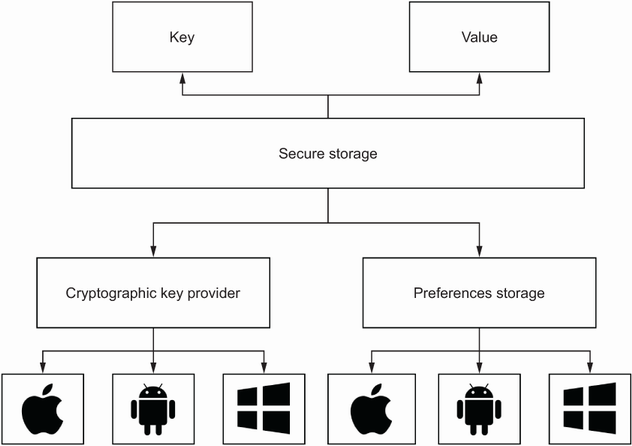
The diagram shows the boundary SecureStorage provides: the app stores a value, while an OS-provided and OS-managed cryptographic key encrypts that value. section 3.3
SecureStorage provides the same API whether encryption is hardware- or software-based, so app code does not need platform-specific encryption handling. It is one option in a local-storage toolkit that also includes Preferences, files, and databases for offline use. section 3.3 section 3.5
