liveBook · Manning

Security connector

As explained in Azure Security

A security connector is an integration resource that stores source-control connection settings and enables Defender for Cloud to connect to a source code management system.

A security connector is an integration resource that stores selected source-control settings and lets Defender for Cloud connect to GitHub or Azure DevOps repositories. This connection enables unified DevOps posture visibility and helps identify repository misconfigurations such as excessive privileges or missing multifactor authentication. section 11.4.1

Create a connector for GitHub through the Azure portal:

  • Sign in to the Azure portal and open the Microsoft Defender for Cloud dashboard. section 11.4.1
  • Select Environment Settings, choose Add Environment, and select GitHub. section 11.4.1
  • Name the connector, select its Azure subscription, resource group, and region, then continue. section 11.4.1
  • Use an identity with Contributor access on the subscription and Security Admin access in Defender for Cloud. section 11.4.1
Figure 11.8 Onboarding your GitHub repositories to Defender for DevOps using the Defender for Cloud dashboard.
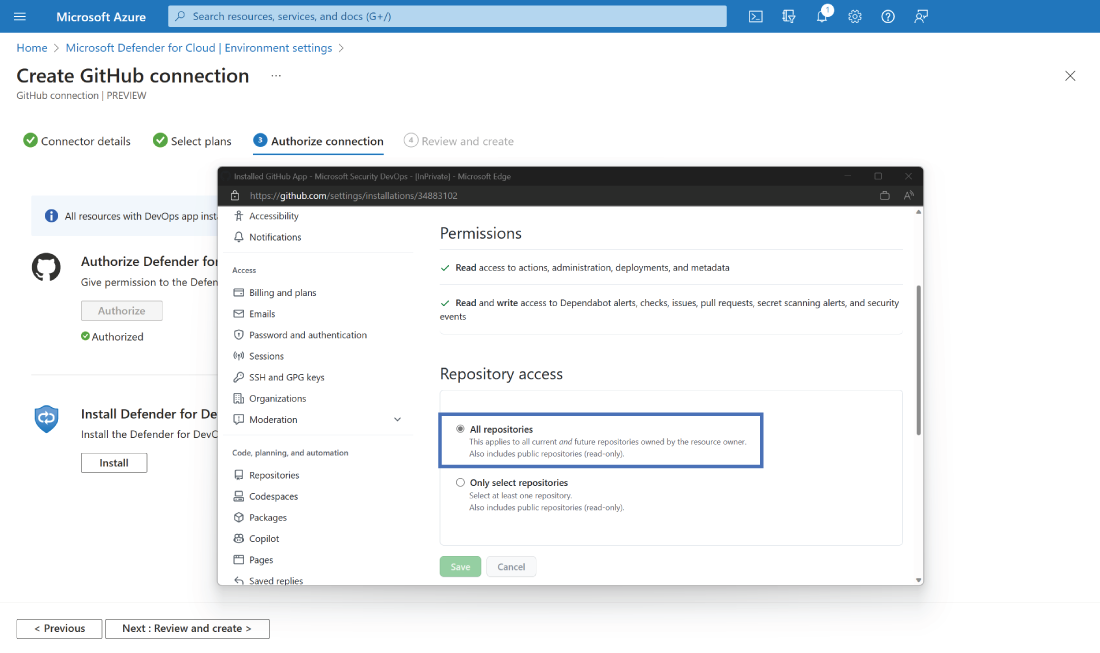
Review the GitHub onboarding flow in the Defender for Cloud dashboard. section 11.4.1

How Azure Security covers it

How deep it goes
Explains the connector’s purpose and gives portal onboarding steps, but does not detail its underlying connection implementation.
Examples
Uses a GitHub connector named ContosoGitHub and specifies an Azure subscription, resource group, and region.
What it assumes
Requires Contributor access on the Azure subscription and Security Admin access in Defender for Cloud.
What you can do after
Operate/configure repository onboarding through the Azure portal and enable Defender for Cloud assessment.
How it connects
Links Defender for Cloud with Defender for DevOps, GitHub, Azure DevOps, repositories, and security posture management.

Related concepts

This explainer was generated by Manning's knowledge graph from the text of Azure Security. The section links point to the parts of the book it draws on.