The selected state is the visual appearance of a selectable .NET MAUI item when it is currently selected. It is one of the built-in common visual states managed by the Visual State Manager. section 10.2.2
Use the selected state to:
- Change a selected CollectionView item's appearance without relying on complex triggers. section 10.2.2
- Set properties such as BackgroundColor through a style scoped to the item template's layout. section 10.2.2
Style a selected product
Define a VerticalStackLayout style with Normal and Selected visual states. In Selected, set BackgroundColor to the Secondary resource, then apply the style to the layout inside the CollectionView DataTemplate. section 10.2.2
Figure 10.13 The selected state in CollectionView makes the background of a selected item a shade of orange (shown here in darker gray). The high contrast makes it easily distinguishable, but the color is not in keeping with the theme or brand of the app.
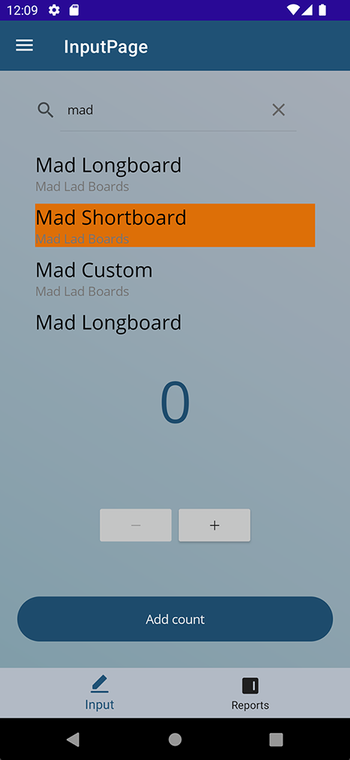
The figure shows the default selected CollectionView appearance and why a themed replacement may be preferable. section 10.2.2
