Seq collects structured application logs and provides a web interface for searching, filtering, and analyzing them. It turns questions such as “Has this recipe error happened before?” into queries over log properties rather than painful text searches. section 26.5
A small ASP.NET Core application can send structured logs to Seq with a familiar provider setup:
- Install the Seq logging provider with the .NET CLI. section 26.5.1
- Call AddSeq() in Program.cs to send logs to the default local Seq URL. section 26.5.1
- Open the Seq web interface at http://localhost:5341, generate application activity, and inspect the resulting events. section 26.5.1
- Capture named message parameters, such as RecipeCount, as searchable structured properties. section 26.5.1
Figure 26.11 The Seq UI. Logs are presented as a list. You can view the structured logging details of individual logs, view analytics for logs in aggregate, and search by log properties.
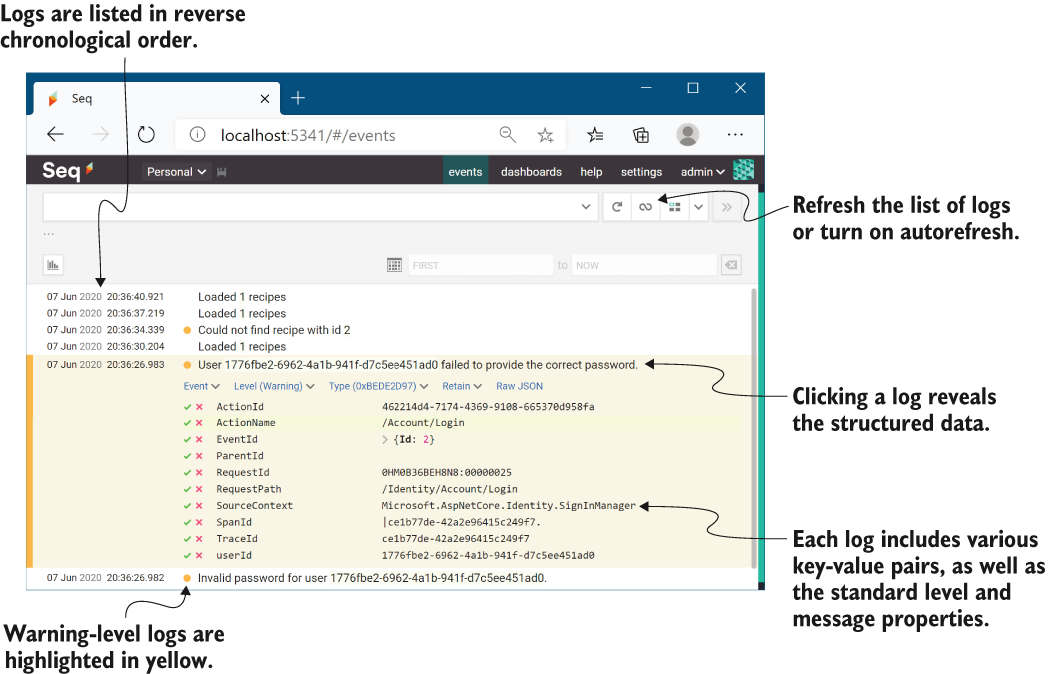
Use the Seq UI to view logs individually, inspect their structured data, analyze events in aggregate, and search by log properties. section 26.5.1
