A stereotype annotation marks a class for Spring to create and manage as a bean—an object in the Spring context. It reduces the configuration code needed for many application classes and can make a class’s responsibility visible to other developers. section 2.2 section 4.3
To add a component using this approach:
- Mark the class with a stereotype annotation, such as @Component. section 2.2
- Use @ComponentScan on a configuration class to tell Spring where to look. When the context is created, Spring finds the marked class, creates an instance, and adds it as a bean. section 2.2
Registering a Parrot
Mark the class with @Component: `@Component public class Parrot { ... }`. Then configure scanning with `@Configuration @ComponentScan(basePackages = "com.example.beans")` on ProjectConfig. If Parrot is in that package, Spring can find it and add an instance to the context. The annotation alone is not enough in this configuration: scanning must also be set up. section 2.2
Figure 2.6 When using stereotype annotations, consider two steps. First, use the stereotype annotation (@Component) to annotate the class for which you want Spring to add a bean to its context. Second, use the @ComponentScan annotation to tell Spring where to look for classes annotated with stereotype annotations.
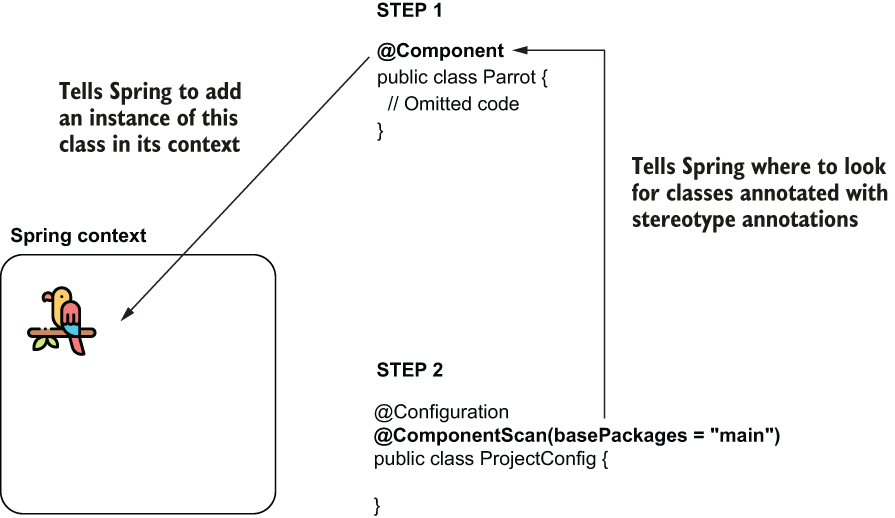
The diagram shows the two steps: mark the class, then tell Spring where to scan. section 2.2
Choose an annotation that communicates the component’s role:
- @Component is a general-purpose marker when no more specific role is needed. section 4.3
- @Service marks a class responsible for implementing use cases. section 4.3
- @Repository marks a class responsible for managing data persistence. section 4.3
Annotate concrete classes that Spring needs to instantiate, not interfaces or abstract classes. An interface can still describe a dependency: Spring can find a bean created from a class that implements it. Avoid adding objects to the context when they do not need Spring’s management. section 4.2.1 section 4.5
Stereotypes are convenient for project classes you can change. Use an @Bean method when you need direct control over creation or need to add an instance of a class outside your application; the two approaches can also be combined. For initialization after Spring creates a component, a lifecycle callback such as @PostConstruct is another option. section 2.2 section 2.5 section 4.2.1
