A servlet container connects a Java web app to HTTP: it translates incoming requests for the app and turns the app’s responses into HTTP. This lets application code focus on Java objects and methods instead of implementing network communication. section 7.1.3 section 7.5
A request-response exchange follows two steps:
- The container calls a servlet associated with the requested path and passes it the request. section 7.1.3
- The servlet uses the request and response objects to build a response, which the container sends to the client. section 7.1.3
Figure 7.6 A servlet container (e.g., Tomcat) speaks HTTP. It translates the HTTP request to our Spring app and the app’s response into an HTTP response. This way, we don’t need to care about the protocol used for communication on the network, as we simply write everything as Java objects and methods.
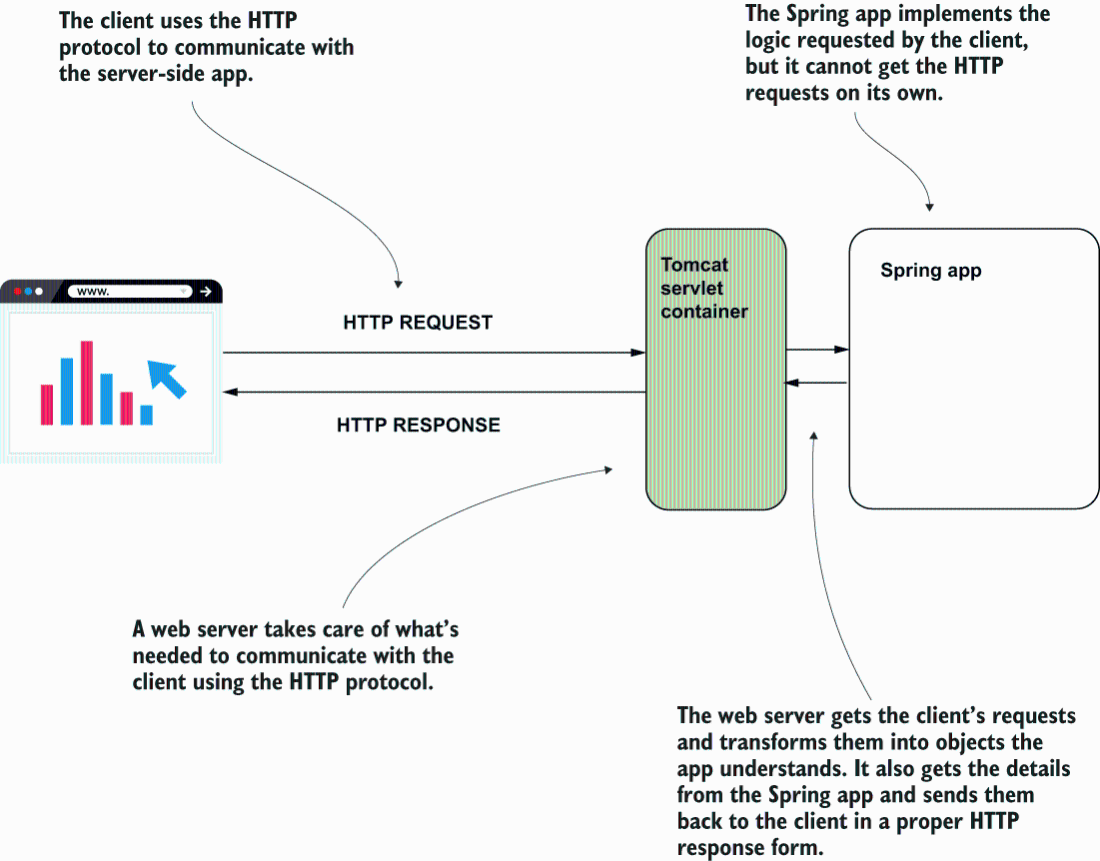
The diagram shows how the container translates requests and responses between HTTP and a Spring app. section 7.1.3
Tomcat by convention
Spring Boot configures Tomcat by default when the web dependency is added; a new app can start Tomcat on port 8080. Jetty, JBoss, and Payara are alternatives. section 7.2.3 section 7.1.3
