A reusable component can break when page-level CSS changes its internal markup, or when page scripts traverse and modify its nodes. Shadow DOM addresses that problem by attaching an encapsulated DOM tree to a host element. The host remains in the page DOM; its shadow tree contains the component’s internal markup and styles. A custom element can use a shadow root, but does not require one. section 7.8 section 7.5.1
Attach and render a shadow root
class MyComponent extends HTMLElement { constructor() { super(); this.attachShadow({ mode: 'open' }); } connectedCallback() { this.shadowRoot.innerHTML = `<style>button { color: white; background: black; }</style><button>Click me</button>`; } } customElements.define('my-component', MyComponent); The button rule applies inside the shadow tree, not to buttons elsewhere on the page. Choose a rendering strategy deliberately: using innerHTML, creating nodes with the DOM API, and cloning templates have different readability, performance, and security implications. section 7.8.3 section 7.13
Treat the boundary as a component-design decision, then define the ways consumers may interact with it:
- Choose open or closed mode. Page-level selectors and document.querySelector do not cross either boundary. With open mode, consumers can reach the tree through host.shadowRoot; with closed mode, that property returns null. Keep the reference returned by attachShadow() if the component itself needs a closed root. section 7.8 section 7.8.3
- Keep attributes, properties, methods, and events as the public contract rather than relying on consumers to manipulate internal nodes. Events crossing the boundary are retargeted toward the host; a bubbling, composed CustomEvent can communicate outward. section 7.5.1 section 7.13
- Expose only the styling and content hooks needed: CSS custom properties for theming, named parts for selected internal elements, :host() for host state, and slots for content supplied as children of the host. section 7.12 section 7.5.2
Figure 7.7 A shadow DOM can expose and receive styles from the page DOM using different techniques, such as through custom properties (set in the page DOM or in the shadow root element), through the definition of parts, or using the :host() pseudo-class to read shadow host state properties.
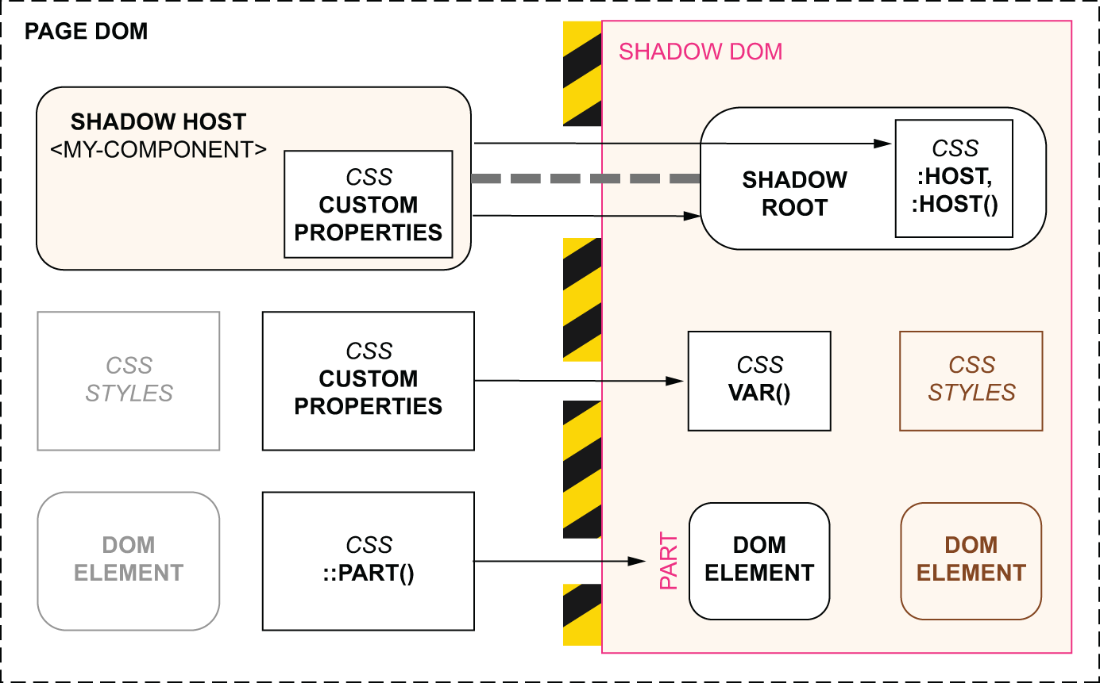
The diagram distinguishes the styling paths across the boundary: custom properties, exposed parts, and host-state selectors. section 7.12
An open shadow tree remains testable through element.shadowRoot; for slotted content, inspect a slot’s assignedElements() rather than inferring assignment from outer HTML. A declarative shadow root can render before its custom element is registered. If interactivity must wait for hydration, avoid hiding the whole component and losing that early render. section 9.7.2 section 9.6.4



