Suppose you need to upload a static website to Azure Storage. AzCopy can move the files, but it needs permission to do so. A shared access signature (SAS) token provides temporary, limited access to specified Azure resources without using a username and password. section 9.2.1 section 9.2.2
A SAS token is a string appended to a resource URI. It carries permissions and start and end times. When someone uses the resulting URI, Azure checks the token and grants or denies the request. Think of it as a pass for particular resources and actions—not a general invitation into the storage account. section 9.2.2
Figure 9.3 The SAS URI consists of the resource URI and then the SAS token as a query parameter.
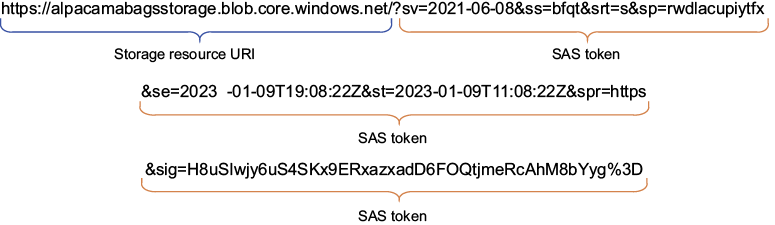
The figure shows where the SAS token sits: after the resource URI, as a query parameter. section 9.2.2
In the Azure Portal, open the storage account’s Shared Access Signature menu and choose the scope of the pass:
- Allowed services: Blob, File, Queue, or Table. section 9.2.2
- Allowed resource types: the account, containers, or individual objects. section 9.2.2
- Allowed permissions and start and end times: grant what the task needs, for only as long as it needs it. Permissions that do not apply to a selected resource type are ignored. section 9.2.2
Upload a static website
Generate a SAS token for the storage account, then use its SAS URI to authenticate AzCopy commands that create the $web container and recursively copy the website files into it. Entra ID is another authentication option; the SAS token is useful when you want this particular job to have bounded access. Check the permissions and expiry before running the upload: too much access is risky, while too little can prevent the task. section 9.2.1 section 9.2.2

