Want to recover detail after denoising? A sharpening filter increases contrast between each pixel and its neighborhood. Its kernel places a large positive value at the center and negative values around it, then normalizes the values so filtering stays within a useful range. Clipping remains a final safeguard for values outside the allowed range. section 3.1.4
Sharpening a blurred image
A 5×5 kernel uses 50 at the center and −1 elsewhere. After division by the kernel sum, apply it with the same color-channel convolution used for blurring: img_restored = color_convolution(img_blur, kernel_sharpen). The result restores some sharpness while retaining the earlier noise reduction. section 3.1.4
Figure 3.8 Original image (top left), noised (top right), denoised but blurred (bottom right), and sharpened (bottom left) versions of the image
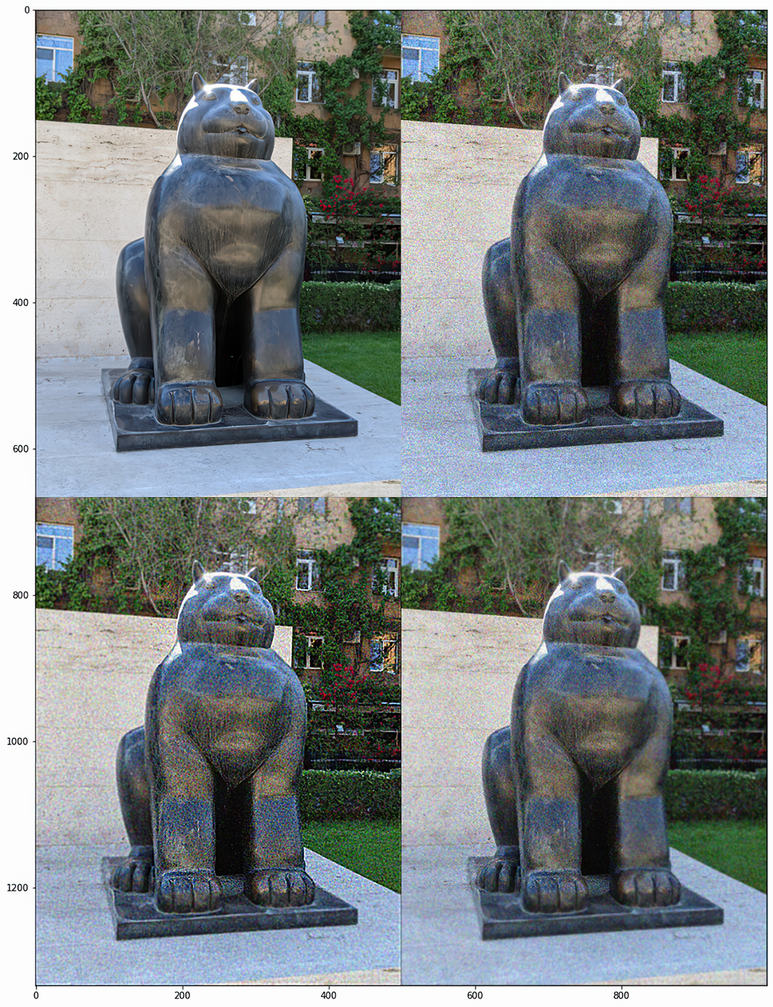
Compare the original, noisy, blurred, and sharpened image versions to see the tradeoff between denoising and recovered sharpness. section 3.1.4
