show etherchannel summary is a Cisco IOS verification command that displays each EtherChannel, its negotiation protocol, status flags, and member ports. Use it to confirm whether links are bundled or operating independently. section 16.2.1 section 16.5
Read the output by checking the port-channel flags first, then the member-port flags:
- Po1(SU) indicates a Layer 2 EtherChannel that is in use: S means Layer 2 and U means in use. section 16.2.1
- Po1(SD) indicates a Layer 2 EtherChannel that is down; an unconfigured neighbor can cause this state. section 16.2.1
- Gi0/0(P) and Gi0/1(P) are bundled in the port-channel, while Gi0/0(I) and Gi0/1(I) are stand-alone. section 16.2.1
- Check that both switches use the same negotiation protocol; PAgP and LACP cannot form one EtherChannel together. section 16.5
Healthy and failed checks
A failed PAgP negotiation can produce `Po1(SD) PAgP Gi0/0(I) Gi0/1(I)`. After configuring the peer, healthy output becomes `Po1(SU) PAgP Gi0/0(P) Gi0/1(P)`. The protocol column identifies PAgP or LACP, while the flags reveal whether the bundle is operational. section 16.2.1
Figure 16.5 An EtherChannel is formed between SW1 and SW2 using PAgP. SW1’s G0/0 and G0/1 ports are configured in PAgP desirable mode, and SW2’s G0/0 and G0/1 ports are configured in PAgP auto mode. switchport mode trunk is applied to each switch’s port channel interface to make the EtherChannel a trunk.
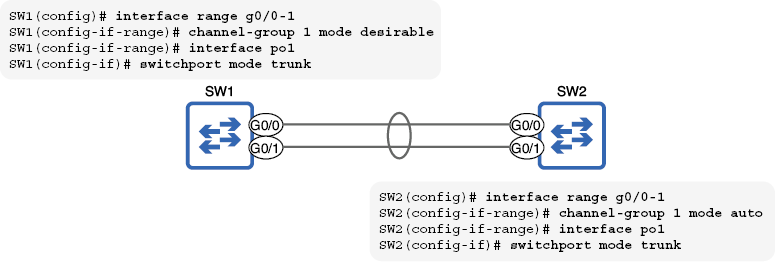
Use the EtherChannel topology to relate the command output to the physical member links and the single logical Port-channel interface. section 16.2.1
