liveBook · Manning

Show ip ospf neighbor

As explained in Acing the CCNA Exam: Volume 1 Fundamentals and Protocols

show ip ospf neighbor is a Cisco IOS command that displays information about OSPF neighbor relationships.

show ip ospf neighbor displays the OSPF neighbor table, helping verify which routers have discovered one another and the state of each relationship. section 18.3.1

Reading neighbor output

R2# show ip ospf neighbor displays R1 in INIT/DROTHER, indicating that R2 received an OSPF hello but did not yet see its own router ID in that hello. R1's output shows R2 in 2WAY/DROTHER; the routers recognize each other but have not exchanged routing information. section 18.3.1

Figure 18.9 The OSPF neighbor states: Down, Init, 2-Way, ExStart, Exchange, Loading, and Full. Routers that reach the 2-Way state are OSPF neighbors. Some routers remain in this state, and some proceed to establish a full adjacency.
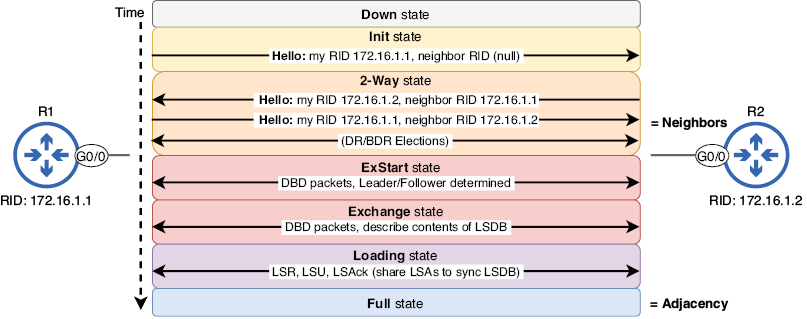
Use the neighbor-state sequence to interpret entries ranging from Down and Init through 2-Way, ExStart, Exchange, Loading, and Full. section 18.3.1

How Acing the CCNA Exam: Volume 1 Fundamentals and Protocols covers it

How deep it goes
Interprets neighbor-table fields and states, stopping short of configuring OSPF or examining complete interface details.
Examples
Uses R1 and R2 neighbor-table listings showing INIT/DROTHER and 2WAY/DROTHER entries.
What you can do after
Diagnose OSPF discovery and adjacency progress by inspecting neighbor IDs, states, timers, addresses, and interfaces.
How it connects
Connects OSPF neighbors with hello messages, router IDs, neighbor states, DR/BDR elections, and full adjacencies.

This explainer was generated by Manning's knowledge graph from the text of Acing the CCNA Exam: Volume 1 Fundamentals and Protocols. The section links point to the parts of the book it draws on.