A sink connector exports event records from Kafka topics to an external system. It is the outbound half of Kafka Connect: source connectors bring data into Kafka, while sink connectors deliver it to targets such as Elasticsearch, Google BigQuery, or Redis. Multiple sink connectors can independently export the same topic, allowing other systems to receive existing application data without changing the original application. section 5.1
A connector does not move each record itself. A SinkConnector creates task configurations, and SinkTask instances perform the data movement. Connect starts and distributes those tasks across workers in distributed mode; each task runs in its own thread. The connector chooses how many tasks to create, up to tasks.max, so that setting is a limit rather than a guarantee. section 5.3
Figure 5.4 Connect in distributed mode; tasks get spread around to other connector instances.
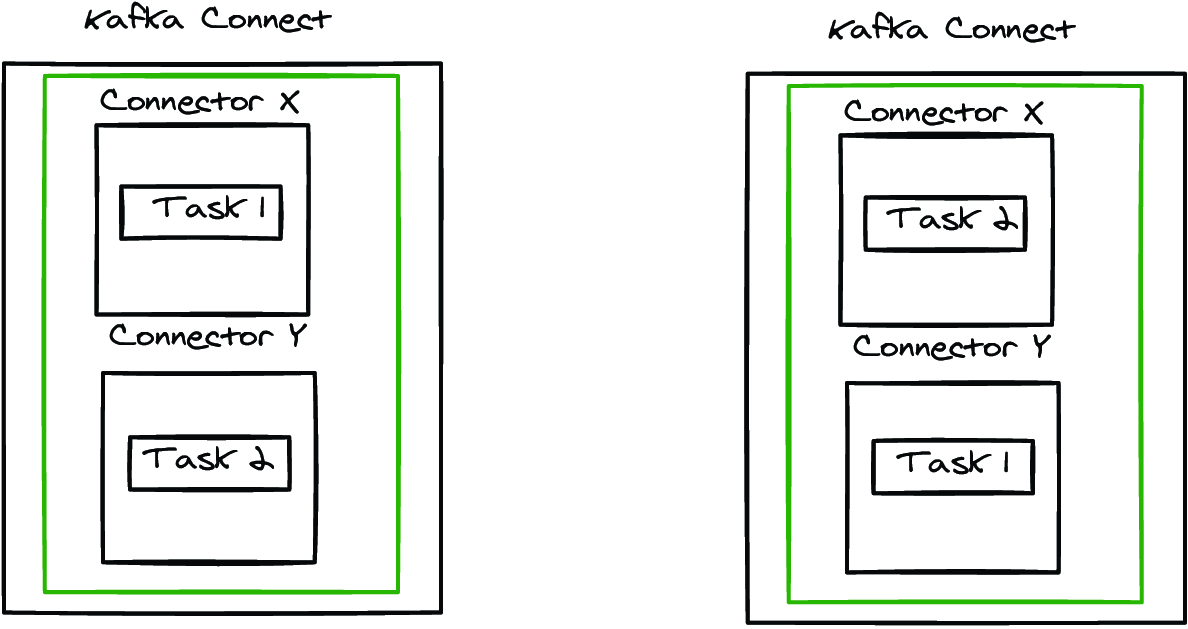
Use the distributed-mode diagram to distinguish the connector’s control role from task instances that Connect spreads across workers for throughput and continued processing after worker failure. section 5.3
Run an available connector as a configured plugin rather than application code. Install its files on the Connect cluster and submit JSON configuration through the Connect REST API. A sink configuration identifies the connector class, target connection details, topic to read, converters, and task limit. Connector-specific settings define how records are written to the target. section 5.1 section 5.5
Index student information in Elasticsearch
Configure an Elasticsearch sink connector to read the postgres_orientation_students topic and write records to Elasticsearch. The configuration uses one task, a JSON value converter with schemas disabled, and settings controlling schema and key handling. Because external writes can fail, configure error tolerance and a dead-letter-queue topic; use replication factor 1 for that DLQ in a single-node Docker cluster. section 5.5 section 5.5
Shape records at the connector boundary when the required change is lightweight:
- Apply Single Message Transforms after conversion on the outbound sink path. section 5.4
- Chain transforms in declared order to create a key from user_name, extract that field, and mask an ssn value. section 5.4
- Use SMTs only for one-record changes; use Kafka Streams or ksqlDB instead for joins, aggregations, or other complex processing. section 5.4


