liveBook · Manning

Slope graph

As explained in Data Storytelling with Altair and AI

A slope graph, or slope chart, is a line-based chart that compares values at two endpoints by connecting corresponding points.

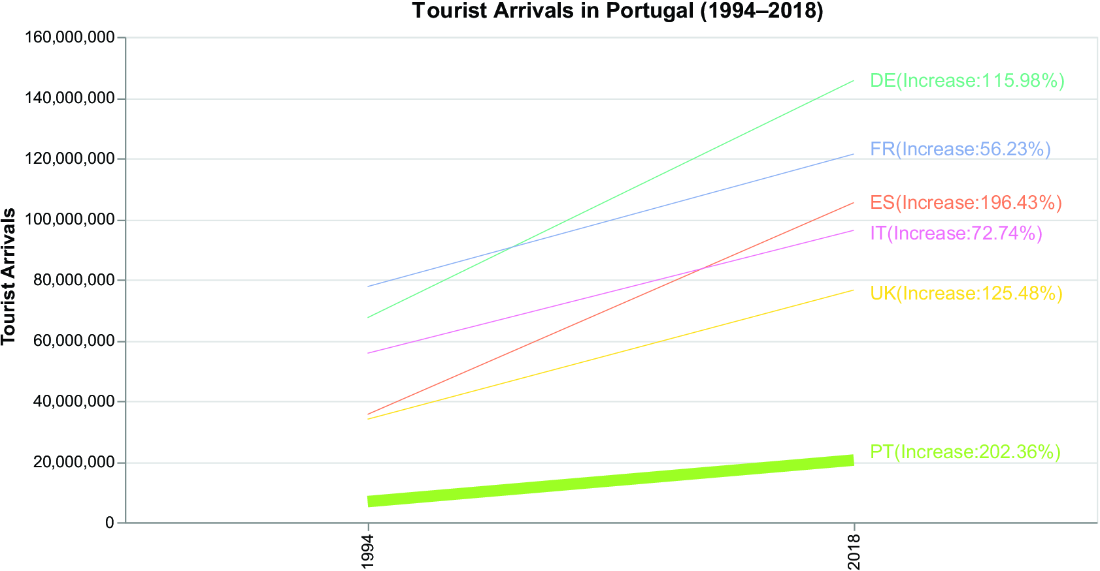
A slope graph is a line chart that compares each series at two endpoints, connecting its first and last values. By removing intervening years, it directs attention to the change between chosen dates rather than the full trend. section 2.3.1

Use it when the audience needs a direct before-and-after comparison. Choose the measure carefully: tourist-arrival counts answer a different question from percentage increase, even when both use the same dates. section 2.3.1

Tourist arrivals, 1994 to 2018

Filter the data to 1994 and 2018, then draw one line per country with tourist arrivals on the y-axis. This contrasts with a stacked bar chart exercise built from the same slope-chart result. section 2.3.1

Figure 2.11 The output of exercise 1
figure

The example output shows the requested two-endpoint slope graph for the tourist-arrivals comparison. section 2.3.1

How Data Storytelling with Altair and AI covers it

How deep it goes
Defines the chart through an exercise but defers the implementation to a provided solution file.
Examples
Uses country-level tourist arrivals in 1994 and 2018, then asks for a stacked-bar transformation.
What you can do after
Build it from scratch by retaining two years and plotting tourist-arrival values by country.
How it connects
Connects line charts, stacked bar charts, tourist arrivals, percentage increase, DataFrames, and Altair.

Related concepts

This explainer was generated by Manning's knowledge graph from the text of Data Storytelling with Altair and AI. The section links point to the parts of the book it draws on.