liveBook · Manning

Small office/home office network

As explained in Acing the CCNA Exam: Volume 2 Advanced Networking and Security

A SOHO network is a network designed for the limited scale and connectivity needs of a small office or home office.

A small office/home office (SOHO) network serves a very small business or home with about 1 to 10 users. Its design favors simple, low-cost connectivity over the layered architectures used in larger networks. section 15.4 section 15.0

A typical SOHO network commonly centralizes these functions in one wireless router:

  • Router: forwards packets between the local network and the internet. section 15.4
  • Ethernet switch: connects wired end-user devices. section 15.4
  • Firewall: blocks connections originating from the internet. section 15.4
  • Wireless access point: connects Wi-Fi clients; some models also provide modem functionality for particular internet connection types. section 15.4

Typical SOHO deployment

A home or small business can connect its wired devices, Wi-Fi clients, and internet service through one wireless router. Most such networks use one internet connection, so a service loss is inconvenient rather than an enterprise emergency. section 15.4 section 15.5

Figure 15.11 A wireless router functions as a router, a switch, a firewall, and a wireless access point.
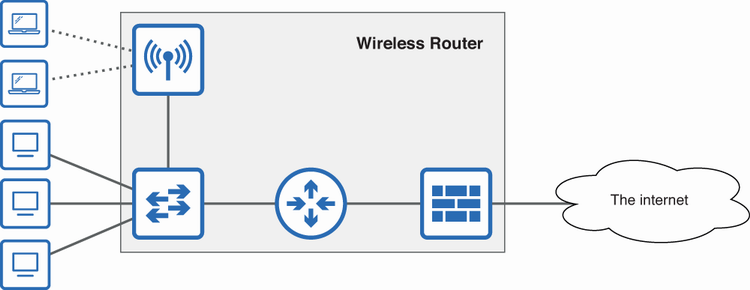
Use the diagram to identify how one wireless router combines routing, switching, firewall, and wireless-access-point roles. section 15.4

How Acing the CCNA Exam: Volume 2 Advanced Networking and Security covers it

How deep it goes
Defines the 1-to-10-user scale, identifies combined device functions, and explains the trade-off between cost and redundancy.
Examples
Uses a home or small-business network centered on a wireless router with wired ports, Wi-Fi antennas, and an internet port.
What it assumes
Assumes basic awareness of networks and internet connectivity while defining the roles combined inside a wireless router.
What you can do after
Evaluate whether a single wireless router and internet connection fit a small network’s scale, needs, and reliability expectations.
How it connects
Connects routers, switches, firewalls, wireless access points, modems, internet connections, and enterprise network redundancy.

Related concepts

This explainer was generated by Manning's knowledge graph from the text of Acing the CCNA Exam: Volume 2 Advanced Networking and Security. The section links point to the parts of the book it draws on.