Snowpipe continuously loads newly available files from cloud storage into Snowflake tables. Rather than running a pipeline on a fixed schedule, it responds to file-arrival events, making it suitable when consumers need fresh data with minimum delay. It loads from a stage with a COPY statement, much like bulk loading, but event triggering replaces interval-based micro-batches. section 1.1.2 section 5.1
Figure 5.1 Data pipeline that continuously ingests data from JSON files in external cloud storage with Snowpipe. A storage integration object exposes the files in an external stage. A notification integration object configured with cloud messaging notifies Snowpipe when new files arrive so they can be ingested into the staging table with minimum delay. The JSON data in the staging table is flattened and materialized by a dynamic table.
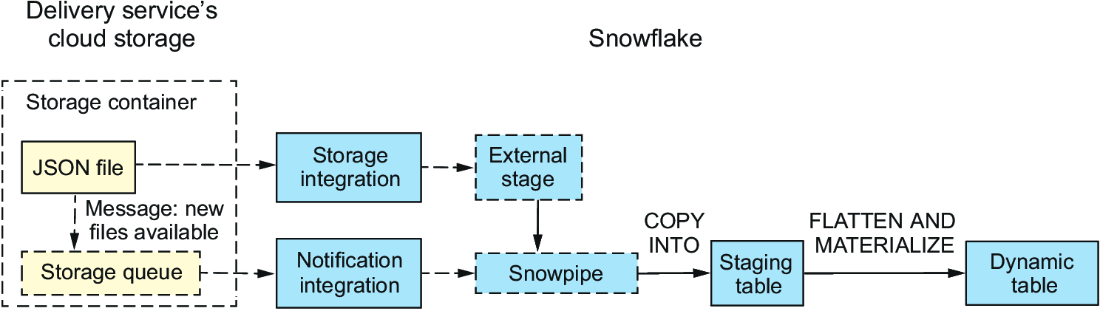
A continuous pipeline exposes cloud files through a storage integration and external stage, sends arrival notifications through cloud messaging, loads a raw staging table with Snowpipe, then transforms JSON through a dynamic table. section 5.0
A Snowpipe is a pipe object containing the COPY definition that loads staged files into a relational target table. Snowflake supplies and selects the ingestion compute behind the scenes, rather than requiring a user-defined virtual warehouse. Source files may be CSV or semistructured data such as JSON. section 5.3
Configure event-driven ingestion in this sequence:
- Create the external stage and target staging table. The target can retain source metadata such as filename and load timestamp alongside parsed JSON fields. section 5.2.2
- Configure cloud messaging and a notification integration so file-arrival events enter a queue for Snowpipe to consume. section 5.3
- Create a pipe with AUTO_INGEST enabled, the notification integration, and a COPY query from the stage into the target table. section 5.3.3
- Upload a newly named, structurally valid file and query the target table after a short wait to confirm ingestion. section 5.3.4
JSON orders pipe
A pipe can load delivery-order JSON from an Azure-backed external stage into a raw table. Its COPY query extracts Order id and Order datetime, preserves the Items array as VARIANT, and records metadata$filename plus the current timestamp. When a blob-storage event reaches the configured queue, the pipe executes that query for the arriving file. section 5.2.2 section 5.3.3
A newly created pipe detects subsequent arrivals, not files already present in storage. Use ALTER PIPE ... REFRESH to detect files uploaded within the previous seven days; load older files with bulk COPY. For operations, inspect SYSTEM$PIPE_STATUS for pipe state and INFORMATION_SCHEMA.COPY_HISTORY for table load history. Newly uploaded data can take a minute or two to appear. section 5.3.3 section 5.3.4
