sort_values reorders a pandas DataFrame’s rows according to values in one or more named columns. It returns a new DataFrame with the same rows, rather than changing the original ordering. On a Series, it orders the Series values instead. Use it when the analytical question is about largest, smallest, cheapest, longest, or otherwise ranked observations—not about the index labels. section 6.0 section 6.2
Choose sort_values when the values carry the ordering you need. sort_index orders by index labels; sort_values can use a single column or several columns. For example, sorting taxi trips by trip_distance answers a different question from sorting them by their existing row index. section 6.2 section 6.6
Find the average fare among the 20 longest taxi trips
Sort trip_distance descending so the longest rides appear first, select total_amount, take the first 20 rows with iloc[:20], and calculate mean(). Chaining keeps the sequence visible: order the rows, isolate the measure, limit the ranked result, then aggregate it. Use ascending=False for highest-first order; ascending order is the default. section 6.2
For tie-breaking or grouped rankings, pass a list of columns and a matching list of directions. Sorting by passenger_count ascending and trip_distance descending first groups rides by passenger count, then puts longer rides first within each group. A grouped calculation also produces a Series that can be sorted by its calculated values, such as mean fare by passenger count. section 6.2 section 6.6
Common ranking patterns include:
- Use .sort_values(ascending=False).head() to retrieve the highest values, such as countries with the greatest mean tourism receipts. section 6.10
- Use the default ascending order with .head() to retrieve the lowest values, such as countries with the least mean tourism spending. section 6.10
- Sort a Series before .plot.bar() when bar position should run from the smallest value to the largest. section 11.2
Sorting changes row order but does not automatically reset index labels. After sorting, positional selection with iloc or ranking helpers such as head and tail is useful because the old index can be scrambled. If subsequent work needs a fresh numeric index starting at 0, pass ignore_index=True to sort_values; then label-based selection with loc can use that reset index. section 6.4 section 6.2
Prepare ordered data for a bar plot
Count cities by state with groupby('state')['city'].count(), sort the resulting Series with sort_values(), then call plot.bar(). For Pennsylvania city growth, first select the relevant rows and columns, set city as the index, remove percent signs, convert to a numeric type, sort the values, and plot. Sorting belongs after the values are in a form that can be compared numerically. section 11.2 section 11.2
Figure 6.1 Running sort_values on a data frame returns a new data frame with the same rows but ordered according to the named column.
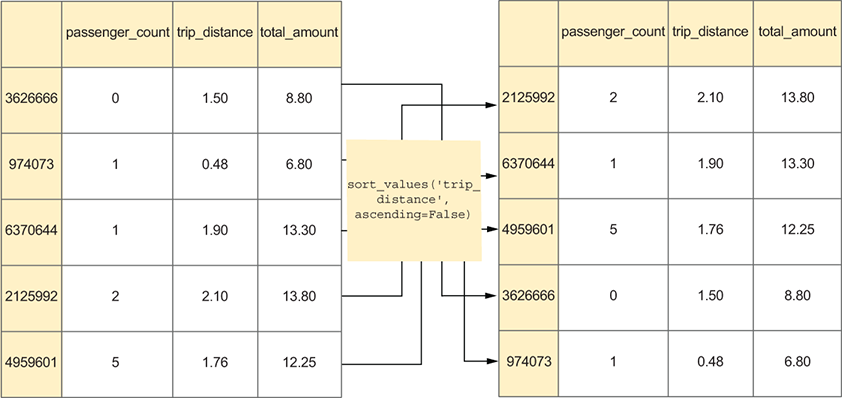
View the returned DataFrame as the same taxi-trip rows rearranged by trip_distance, reinforcing that sorting produces an ordered result rather than a different dataset. section 6.2
