Spring Boot Admin is a web-based administrative frontend for Spring Boot applications. An Admin server receives Actuator data from registered client applications, then displays health, runtime information, metrics, and other operational details in a human-friendly interface. section 16.0 section 16.1
Figure 16.1 The Spring Boot Admin server consumes Actuator endpoints from one or more Spring Boot applications and presents the data in a web-based UI.
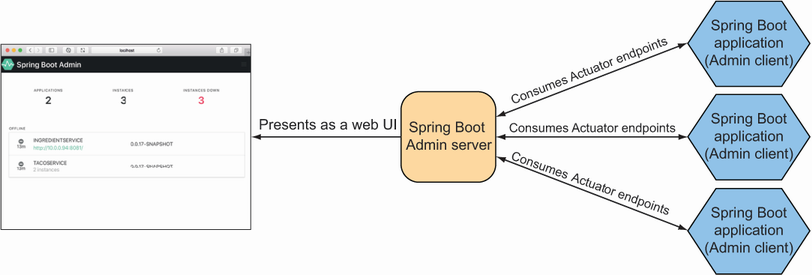
The architecture shows the Admin server consuming Actuator endpoints from one or more Spring Boot applications and presenting the results in a web UI. section 16.1
Build an Admin server as a standalone Spring Boot application:
- Add the Spring Boot Admin server dependency, enable it with @EnableAdminServer, and choose an accessible port such as 9090. section 16.1.1
- Add the Spring Boot Admin client starter to each application, configure spring.boot.admin.client.url, and use spring.application.name as its displayed label. section 16.1.2
- Register clients directly or use Eureka discovery; direct self-registration is the demonstrated approach. section 16.1.2
Monitoring a registered application
Open a registered application in the Admin UI to inspect health and information, JVM memory, thread and processor usage, process statistics, and garbage-collection pauses. Under Metrics, create watches such as HTTP GET requests returning 200 or 404; watched values update live without refreshing the page. section 16.2.1 section 16.2.2
Secure the Admin server with Spring Security because it is not secured by default. A basic setup adds the security starter, configures an administrative username and password, and disables CSRF when necessary so clients can register; richer security schemes remain available. section 16.3 section 16.3.1
