A Spring MVC Model carries named values from a controller to a view, so the same page can display different data for different requests. section 8.1
Passing values to a view
A controller can call addAttribute("username", "Katy") and addAttribute("color", "red"). A Thymeleaf template can use those values to display a personalized, colored greeting. section 8.1
Figure 8.3 The Spring MVC flow. To define a dynamic view, the controller needs to send data to the view. The data the controller sends can be different for each request. For example, in an online shop’s cart functionality, the controller initially sends a list of one product to the view. After the user adds more products, the list the controller sends contains all the products in the cart. The same view shows different information for these requests.
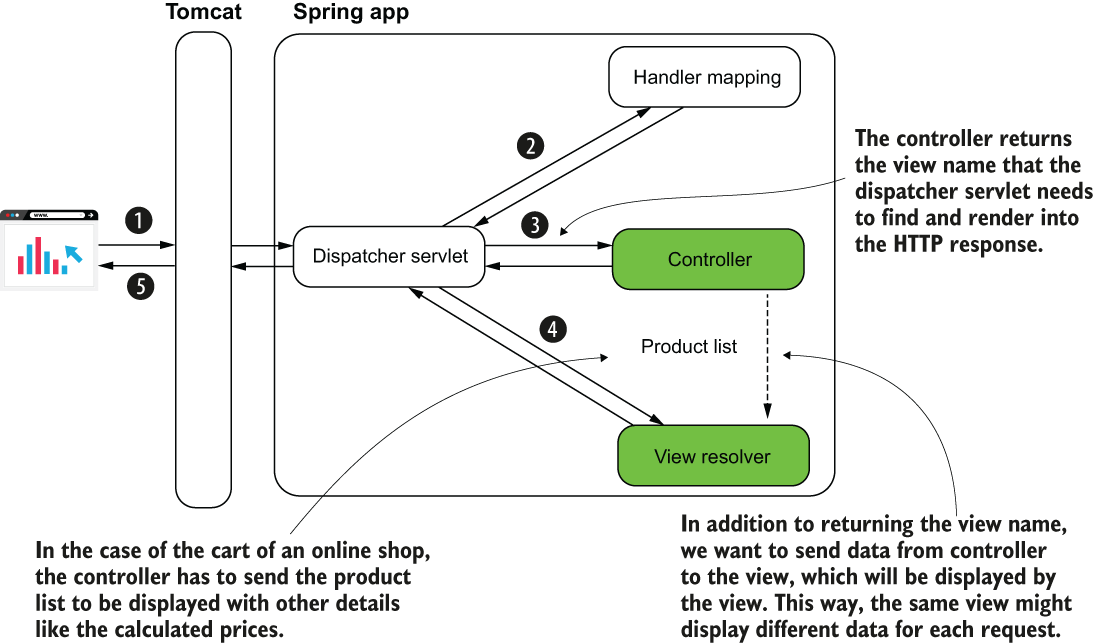
See how a shopping cart view can show different product lists as its data changes between requests. section 8.1
