A database trigger runs logic automatically when a defined event occurs. The implementation here uses MongoDB Atlas rather than SQL: a database trigger watches a collection for document inserts, updates, deletes, or replacements. No SQL trigger syntax is specified. section 19.2.1 section 19.3
Atlas uses change streams to track collection changes. When an event meets a trigger’s criteria, the trigger passes the event object to an associated Atlas Function. That server-side JavaScript function performs the work, such as updating related data or calling another service. section 19.3 section 19.2.1
To set up the Atlas version:
- Choose a Database trigger for collection changes; Scheduled and Authentication triggers respond to different kinds of events. section 19.2.1
- In Add Trigger, name the trigger and set its enabled state. The interface also offers controls for skipping events when reenabled and for event ordering. section 19.2.1
- Connect a function that handles the event object. For debugging, inspect the change event and check fields such as operation type and document key before acting. section 19.2.1 section 19.3
Enrich a new document
A trigger can call an Atlas Function after a document is inserted. The function can call an external embedding API and store the resulting vector alongside the original document, avoiding a separate manual enrichment step. section 19.2.1
Figure 19.5 The Add Trigger interface in Atlas. At the top, you can choose the trigger type: Database or Scheduled. In the Trigger Details section, you can set the trigger’s name, enable or disable it, choose to skip events when reenabled, and control event ordering. (Image © MongoDB 2025)
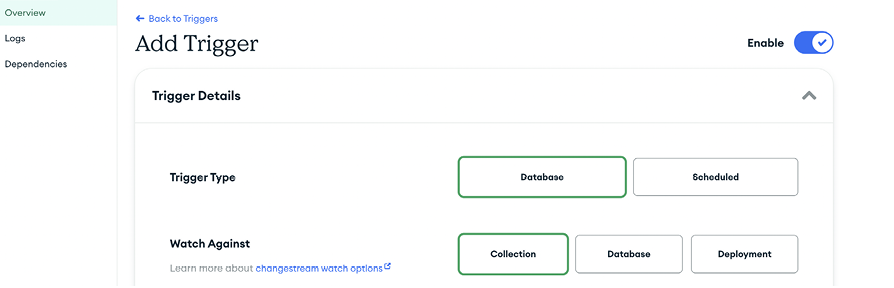
The Add Trigger interface shows the controls used to name, enable, and configure an Atlas trigger. section 19.2.1



