SQLite-net provides SQLite access for .NET MAUI apps through an object-relational mapper (ORM). Define persistent data as familiar C# plain-old CLR objects (POCOs), then use the library to create and work with database tables rather than manually mapping every field. section 3.3
Persist a to-do list
A MauiTodo app models each task with a TodoItem containing an Id, title, due date, and completion flag. Add the sqlite-net-pcl and sqlite-net-sqlcipher NuGet packages, store the database in the app data directory, and use a SQLiteAsyncConnection for database work. Mark the Id as a primary key with auto-increment behavior; SQLite-net can then verify that the TodoItem table exists and create it asynchronously when needed. section 3.3
Use SQLite-net when an app needs to:
- Persist structured application data between launches in a local SQLite database. section 3.3
- Map C# POCOs such as TodoItem to tables through ORM support. section 3.3
- Combine local storage with SQLCipher encryption, keeping the database key in SecureStorage. section 3.3
Figure 3.10 The MauiTodo app will use SQLite to store data. The data will be encrypted using SQLCipher. The database encryption key will be a GUID, which itself will be encrypted and stored by the OS and accessed with the .NET MAUI SecureStorage API.
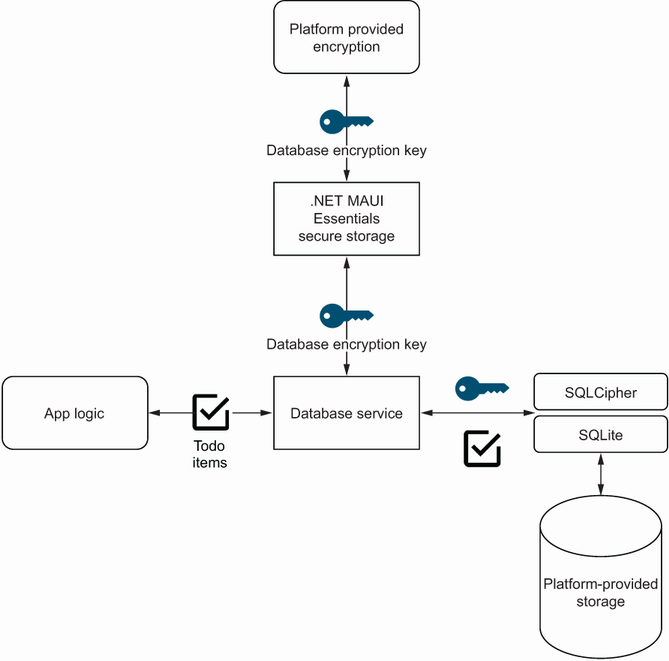
The architecture separates data storage, database encryption, and OS-managed protection of the encryption key. section 3.3
