Math.sqrt(x) returns the square root of a number. In interface work, that makes it useful when a value represents a squared distance: combine the horizontal and vertical offsets, then take the square root to get the direct distance. section 10.2.3 section 1.3.2
A common use is a hover effect that reacts to the pointer’s position inside an element. First find the pointer’s horizontal and vertical offsets from the element center. Then calculate distance with Math.sqrt(mouseX * mouseX + mouseY * mouseY). A pointer at the center has distance 0; moving outward increases the result. section 10.2.3
Scale a hover effect by pointer distance
Calculate the farthest possible center-to-edge distance with Math.sqrt((width / 2) ** 2 + (height / 2) ** 2). Dividing the current distance by that maximum produces a normalized value. That value can increase rotation intensity and apply a subtle scale from 1 at the center to 1.05 at the edge. section 10.2.3
Figure 10.3 The farther the mouse from the center of the element, the more intense the hover effect
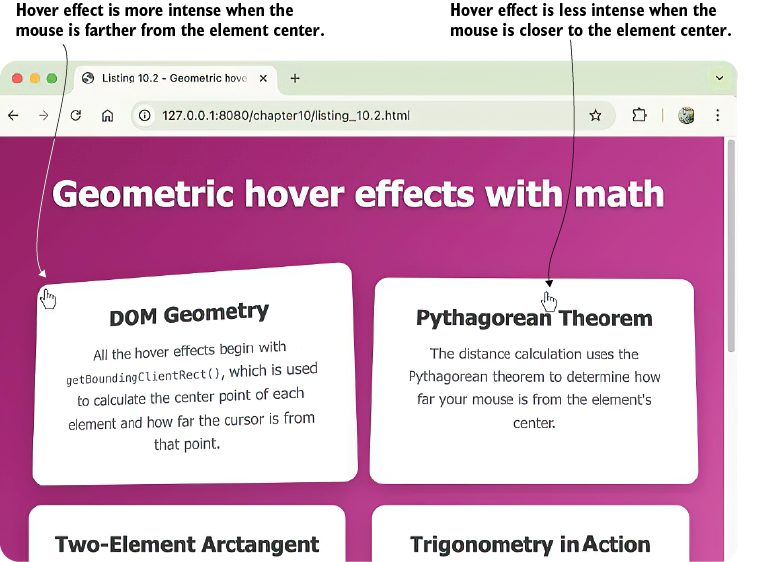
The figure makes the distance-based behavior visible: movement farther from the center produces a stronger hover response. section 10.2.3
Square-root scaling can also make size changes feel more natural than linear scaling. CSS sqrt() is the CSS counterpart of Math.sqrt(); both support proportional scaling effects. For example, multiplying a base circle size by the square root of a distance factor changes width and height without making larger factors grow as aggressively as direct linear multiplication. section 3.2.4 section 3.7
Listing 3.14 Scaling a circle’s width and height using sqrt()
:root {
    --circle-size-base: 160px;
}
.circle {
    --base-size: var(--circle-size-base);
    width: calc(var(--base-size) * sqrt(var(--distance-factor)));
    height: calc(var(--base-size) * sqrt(var(--distance-factor)));
}
.circle:nth-child(2) {
    --angle: 0deg;
    --distance: calc(var(--radius) * 0.6);
    --distance-factor: 1;
}
etc.
This listing applies CSS sqrt() to both dimensions of a circle, showing the proportional-scaling pattern that corresponds to Math.sqrt(). section 3.2.4
Math.sqrt() belongs to the broader Math toolkit alongside Math.pow(), Math.abs(), Math.sin(), Math.cos(), and Math.atan2(). These functions can be combined with arithmetic operators for animations, user interactions, responsive positioning, and data visualizations that update in the browser. section 1.3.2
