A stack frame holds the data needed for one function invocation: its local variables, arguments, and return information. Calls add frames to the call stack; returns remove them so execution can resume in the caller. This is a useful model for reading stack traces and profiles, not a specification of every runtime’s memory layout. section 10.3 section 10.3.4
Reading a call stack
If CheckJokes calls a Newtonsoft test method, which calls DeserializeObject, DeserializeObject is the top frame while it runs. A CPU profiler can match sampled frames to symbols such as assembly, class, and method names, connecting processor use to the active call chain. section 10.3
Frames also help explain two practical limits and tools:
- Each recursive invocation needs another frame. Enough recursive calls can exceed the stack’s maximum size and cause a stack overflow. section 10.3.4
- In PerfView, a filter removes a matching frame and the work below it; a fold skips the frame while retaining work below it; a group combines linked matching frames. These operations reduce noise when inspecting a profile. section 10.3.3
- Keep stack storage distinct from heap allocation. In the C/C++ comparison, a fixed-size local array uses stack space, while a dynamically allocated array uses the heap; the C# array example also allocates an array dynamically. section 10.3.4
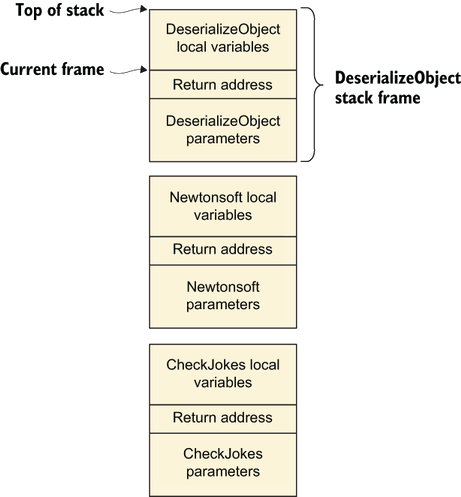
The diagram shows which invocation is on top when DeserializeObject executes and how its frame sits above its callers’ frames. section 10.3


