A Stage represents an environment as a node in Kargo’s promotion graph. It specifies where eligible Freight comes from, the conditions for advancing it, and the steps a Promotion runs. Kargo uses Stages to govern movement between environments; a GitOps agent such as Argo CD deploys the resulting desired state. section 3.2.3 section 1.0
Figure 3.1 Kargo’s core resource model. A Project defines the team-or-service scope (a Kubernetes namespace plus its RBAC). Inside that scope, a Warehouse discovers artifacts and produces Freight. A Stage is a node in the promotion graph; it subscribes to Freight, owns a promotion policy, and owns the Promotion objects that record each advancement event. Every Promotion ties a specific Freight to a specific Stage, recording who advanced it and with what outcome.
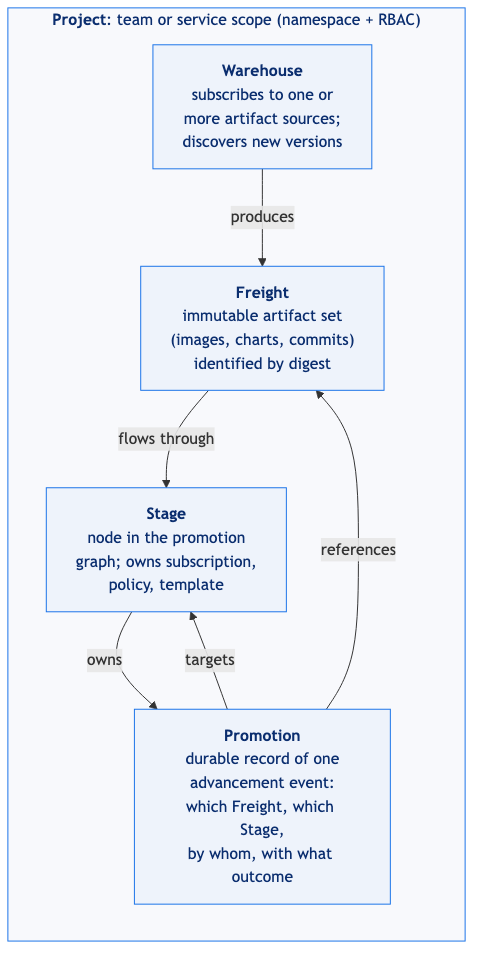
Follow the resource graph: a Warehouse produces Freight, a Stage subscribes to it, and a Promotion records its advancement. The Project supplies the namespace and RBAC boundary. section 3.2
Dev → staging → production
For one container image, dev requests Freight directly from its Warehouse. Staging requests Freight from dev; production requests it from staging. The subscription fields express the ordering: ```yaml # dev: requestedFreight source origin: {kind: Warehouse, name: demo-app} sources: {direct: true} # staging: requestedFreight source origin: {kind: Warehouse, name: demo-app} sources: {stages: [dev]} ``` Each Stage has its own promotion steps, GitOps overlay path, and Argo CD Application. For dev, those steps clone the repository, set the image tag in `envs/dev`, commit and push the change, then request an Argo CD update. Argo CD—not the Stage—reconciles the running workload. section 3.5.6 section 3.5
Check a Stage’s status for its current Freight, promoted version, and verification state; check the Promotion’s status for each step’s result. If staging rejects Freight or shows none eligible, first confirm that the same Freight completed and was verified in dev. Also check that the Stage’s Application name matches the Argo CD Application it should update. section 3.5.7 section 3.6.4