The State Design Pattern lets an object change its behavior when its internal state changes. It names the possible states, centralizes transitions, and delegates state-specific actions to separate state representations. section 13.0 section 13.1
A straightforward implementation keeps state variables and a large conditional branch inside the main object. Every action must account for every state, so state-specific behavior and transition logic remain concentrated in one class. section 13.1.2
Refactoring separates responsibilities:
- Represent each state with a subclass of State, such as READY, VALIDATING, TICKET_SOLD, or SOLD_OUT. section 13.1.3
- Give every state class the action methods the object supports: insert_credit_card(), check_validity(), take_ticket(), and remove_credit_card(). section 13.1.4 section 13.3
- Let the context retain the current State object and delegate each action through polymorphism. section 13.1.3
- Return the next State object from each action; returning the same object means that no transition occurs. section 13.1.3
- Use a StatesBlock to initialize and aggregate state objects, keeping the context and concrete states loosely coupled. section 13.1.3
Automatic ticket machine
A ticket machine moves from READY to VALIDATING when a card is inserted, then to TICKET_SOLD after validation. Taking the ticket decrements the count and returns either READY or SOLD_OUT. Invalid actions still receive state-specific responses, such as rejecting a card, waiting for validation, or requiring the customer to take a ticket first. section 13.1 section 13.1.3
Figure 13.1 A UML state diagram showing the four states and the state transitions of an automatic ticket machine. The machine keeps track of the number of tickets it has, whether a credit card is inserted, and the validity status of the card. Customer and machine actions (numbered, such as 1: Insert card) and certain conditions (in square brackets, such as [card invalid]) can cause transitions from one state to another. This figure only shows actions that cause transitions.
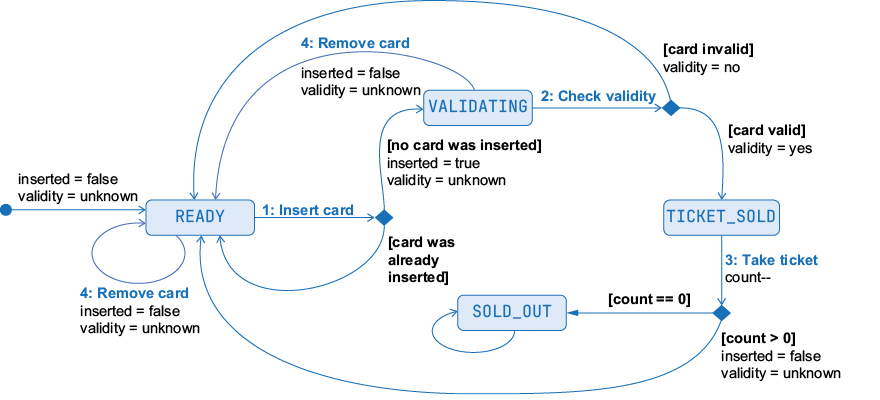
Use the state diagram to trace named states, actions, conditions, and transitions in the ticket machine. section 13.1

