StatusCodePagesMiddleware intercepts error HTTP responses that lack a body and supplies a useful response. It can add Problem Details for APIs or generate friendly HTML error pages for Razor Pages applications. section 5.3.3 section 15.5
Choose the handling style that matches the application:
- Call UseStatusCodePages() to intercept empty 4xx and 5xx responses and apply the configured response behavior. section 15.5
- Pair UseStatusCodePages() with AddProblemDetails() to give API errors, including automatic 404 responses, a consistent Problem Details body. section 5.3.3
- Use UseStatusCodePagesWithReExecute("/{0}") to rerun the pipeline through a status-code-specific path and render an HTML error page. section 15.5
- Use UseStatusCodePagesWithRedirects("/{0}") when the error experience should involve a separate browser request, while recognizing that the original response becomes a redirect. section 15.5
Consistent Problem Details for a missing endpoint
WebApplicationBuilder builder = WebApplication.CreateBuilder(args); builder.Services.AddProblemDetails(); WebApplication app = builder.Build(); app.UseStatusCodePages(); app.MapGet("/", () => Results.NotFound()); app.Run(); The 404 response has no body, so the middleware adds a Problem Details body. Place it early in the pipeline so it can handle errors produced by later middleware. section 5.3.3 section 15.5
app.UseStatusCodePagesWithReExecute("/{0}");
Shows the compact reexecution configuration used to route status-code errors through an error path. section 15.5
Figure 15.6 StatusCodePagesMiddleware reexecuting the pipeline to generate an HTML body for a 404 response. A request to the / path returns a 404 response, which is handled by the status code middleware. The pipeline is reexecuted using the /404 path to generate the HTML response.
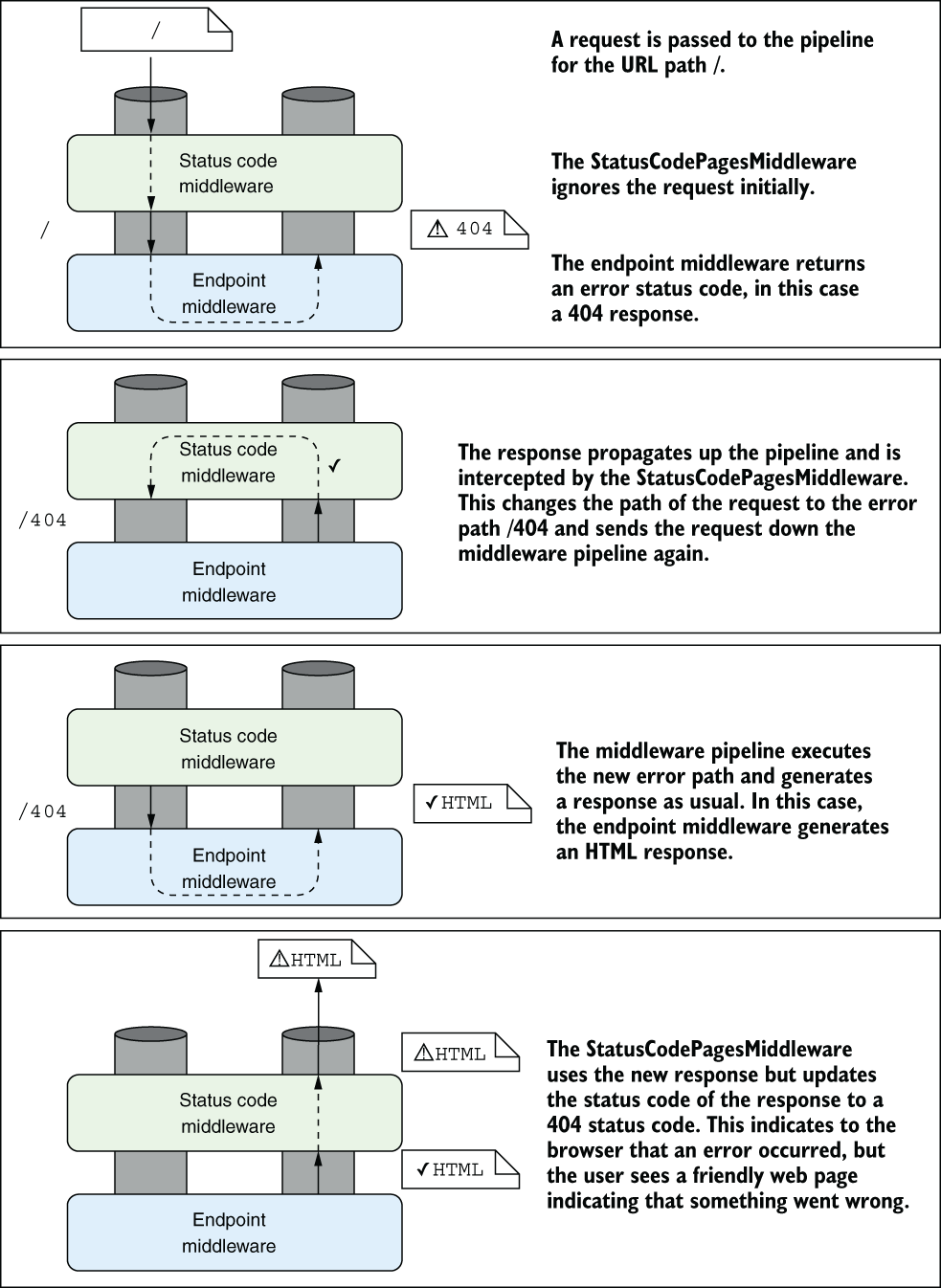
Illustrates how a 404 response can reexecute the pipeline through /404 to produce an HTML response. section 15.5
