Step over is a debugger operation that continues execution to the next execution line without entering a called method. It normally keeps you in the same method and lets you inspect how values change. section 2.2.2
Use step over to investigate code while keeping the execution path manageable:
- Pause at a breakpoint, step over the current line, and inspect variables in scope. section 2.2.2
- Prefer it before step into, because entering methods opens additional investigation plans and increases complexity. section 2.4
- Treat the next execution line as runtime behavior rather than simply the following source line; exceptions can redirect execution. section 2.2.2
Inspecting a computed value
Given `var digits = new StringDigitExtractor(s).extractDigits();`, step over the line and pause afterward. The initialized `digits` value can reveal what the instruction did without entering `extractDigits()`. Enter the method only when that observation is insufficient. section 2.2.2
Figure 2.12 The navigation operations help you walk through the app logic in a controlled way to identify how the code works. To navigate through code, you can use the buttons on the IDE’s GUI or use the keyboard shortcuts associated with these operations.
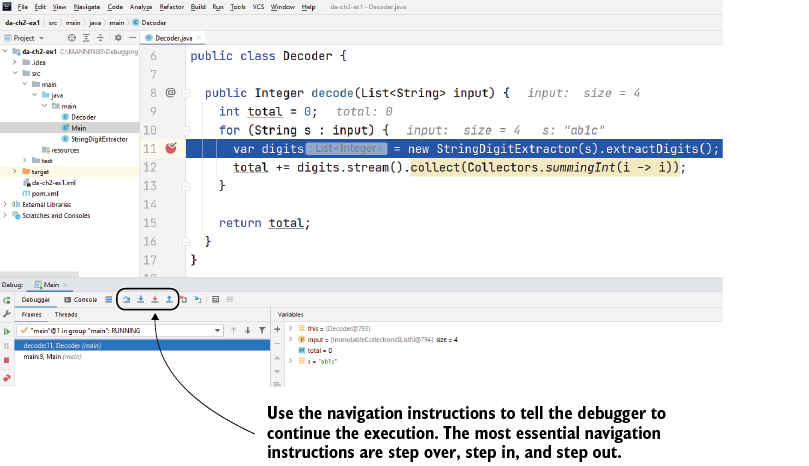
The navigation diagram connects step over with the debugger’s GUI controls and keyboard shortcuts. section 2.2.2

