Step scaling adjusts an Auto Scaling group’s desired capacity when a CloudWatch alarm detects that a metric has crossed a threshold. Unlike target tracking, it supports different capacity adjustments for different degrees of threshold breach. section 17.2.2
A step-scaling setup connects these components:
- A metric records workload, such as EC2 CPU usage or the approximate number of visible SQS messages. section 17.2.2 section 17.3.2
- A CloudWatch alarm evaluates the metric over configured periods and invokes a scaling policy when its comparison condition is met. section 17.2.2 section 17.3.2
- A step-scaling policy applies a capacity change, such as adding one EC2 instance; additional steps can provide finer-grained responses. section 17.2.2 section 17.3.2
- A second alarm and policy can reverse the action when demand falls, such as scaling down when a queue becomes empty. section 17.3.2
URL-to-image workers
An asynchronous URL2PNG application measures SQS queue length. A high-queue alarm invokes a step-scaling policy that adds one instance, while a low-queue alarm removes capacity after processing finishes. A load test generates 250 messages so the alarm, instance launch, and later scale-down can be observed. section 17.3.2
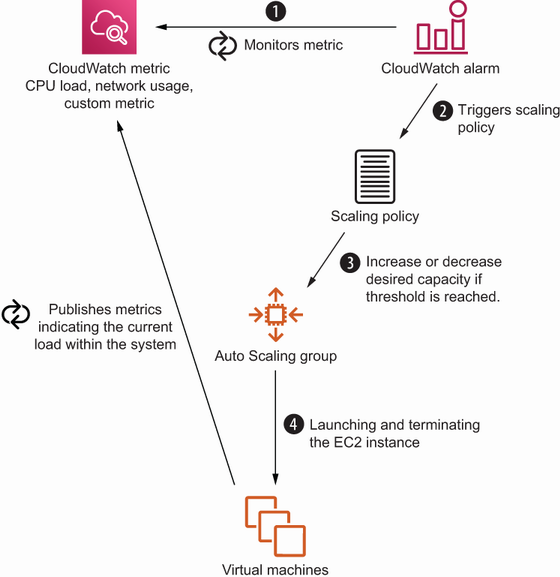
Trace the flow from EC2 or other service metrics through a CloudWatch alarm to an Auto Scaling capacity change. section 17.2.2
Listing 17.8 A step-scaling policy adding one more instance to an Auto Scaling group
# [...]
ScalingUpPolicy:
  Type: 'AWS::AutoScaling::ScalingPolicy'           #1
  Properties:
    AdjustmentType: 'ChangeInCapacity'              #2
    AutoScalingGroupName: !Ref AutoScalingGroup     #3
    PolicyType: 'StepScaling'                       #4
    MetricAggregationType: 'Average'                #5
    EstimatedInstanceWarmup: 60                     #6
    StepAdjustments:                                #7
    - MetricIntervalLowerBound: 0                   #8
      ScalingAdjustment: 1                          #9
# [...]
Inspect a CloudFormation step-scaling policy using ChangeInCapacity, instance warmup, and a step adjustment of one instance. section 17.3.2
