Storage autoscaling automatically increases a database deployment’s persistent storage when disk utilization becomes high. In Atlas, it is enabled by default and triggers when any cluster node reaches 90% disk usage. section 10.2.3
The increase is not instantaneous: Atlas must prepare and copy data to new disks. A sudden bulk insert or other high-speed write workload can therefore exhaust storage before scaling completes. section 10.2.3
Atlas applies provider-specific capacity rules and operational behavior:
- AWS and GCP increase capacity toward 70% disk utilization; Azure doubles the current storage amount. section 10.2.3
- Storage scales up automatically but never down; reducing capacity requires a manual change. section 10.2.3
- If new storage exceeds the current tier’s limits, Atlas can scale the cluster tier to support it, subject to the configured maximum. section 10.2.3
- Disabling storage autoscaling changes oplog management: General and Low-CPU clusters use 5% of disk size, while NVMe clusters use 10% at creation. section 10.2.4
Preparing for a bulk insert
Before a high-speed bulk insert, manually scale the cluster or its storage rather than relying on autoscaling alone. This gives Atlas time to provide capacity and reduces the risk of running out of disk space. section 10.2.3
Figure 10.3 The Atlas UI’s Cluster Tier section, where you can configure cluster and storage autoscaling (Image © MongoDB 2025)
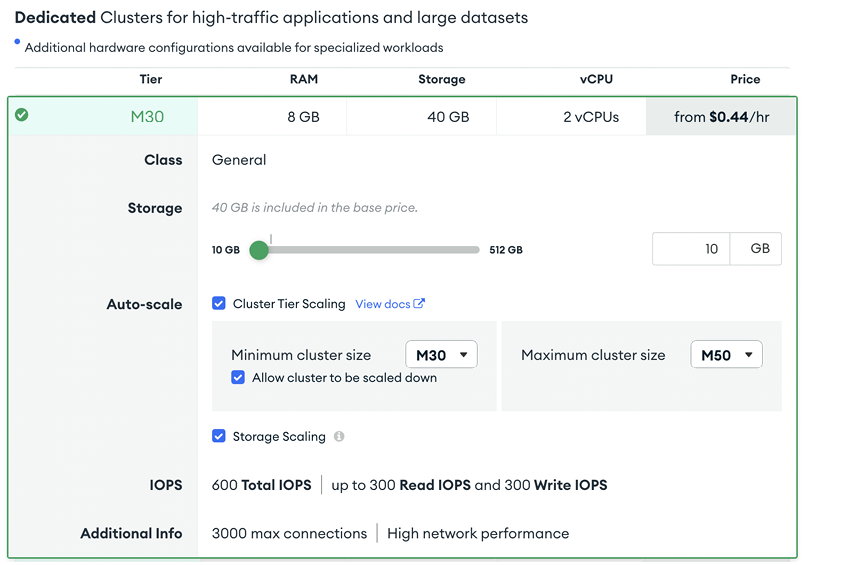
Use the Atlas Cluster Tier configuration view to inspect and configure cluster and storage autoscaling together. section 10.2.3
