`str.contains` searches each value in a pandas Series for a pattern and returns a Boolean Series with the same index. Treat the result as a row-by-row answer sheet: `True` marks values that match, and that Boolean Series can directly filter the original data. section 9.0 section 9.2
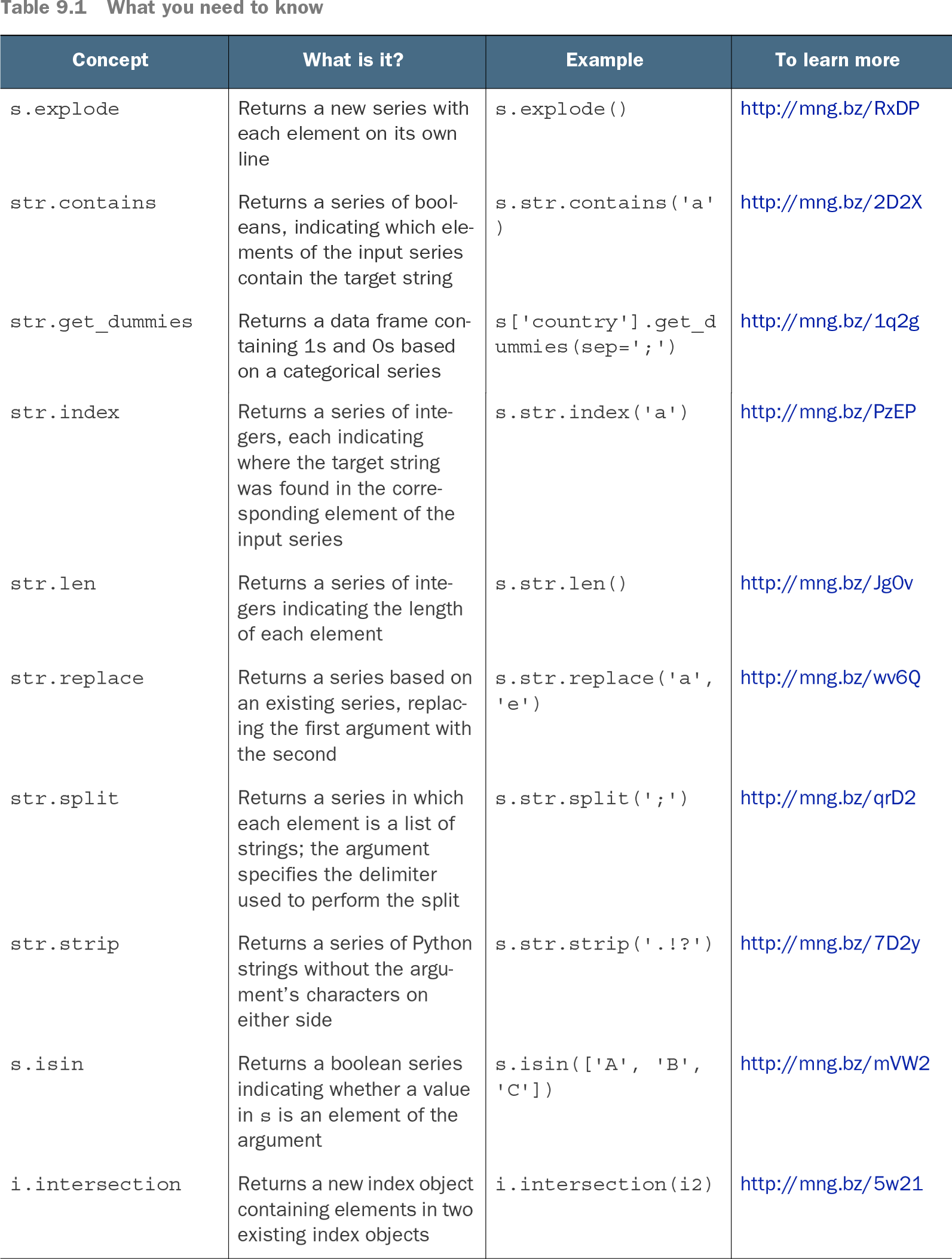
Table 9.1 What you need to know (view table figure)
Use this compact reference to place `str.contains` among related Series string operations: it tests whether each element contains a target string. section 9.0
Select respondents who reported Python
Survey language responses can contain several semicolon-separated values, such as `Python;JavaScript`. First remove missing `LanguageHaveWorkedWith` values, because applying `str.contains` to `NaN` causes an error. Then use the Boolean result to retain matching rows: `so_df = so_df.dropna(subset=['LanguageHaveWorkedWith'])` `so_df = so_df.loc[so_df['LanguageHaveWorkedWith'].str.contains('Python')]` This identifies respondents whose reported languages include `Python`, while leaving later analysis free to compare their experience distribution with another survey. section 8.2 section 8.2
The search pattern can be a regular expression, not merely literal text. For example, `[ae]` matches words containing either `a` or `e`. Be explicit with `regex=True` when regular-expression behavior is intended, rather than relying on a default that may change. section 9.0
Find capitalized words
A regular expression can describe the whole word, not just a substring. `^[A-Z]\w*$` matches a word that begins with an uppercase letter and continues through its end with zero or more alphanumeric characters. The anchors `^` and `$` make the test apply to the entire value, and `\w*` retains single-letter words such as `A` and `I`. `capitalized = s.str.contains('^[A-Z]\w*$', regex=True)` `words = s.loc[capitalized]` Clean punctuation first when quoted or punctuated words would otherwise hide an initial capital: `s.str.strip(string.punctuation).str.contains('^[A-Z]\w*$', regex=True)`. Apply that mask back to `s`, then use `count()` to total the selected words. section 9.2 section 9.2
Use the result as part of a broader filtering workflow:
- Remove missing values in the searched column before testing it when missing entries would cause an error. section 8.2
- Store or immediately use the Boolean Series as a mask with `.loc` to keep matching values or rows. section 9.0 section 9.2
- Chain other string methods before searching when normalization matters, such as stripping punctuation before testing capitalization. section 9.2
- Count selected values after filtering when the analytical question asks how many matches occur. section 9.2