Stream branching splits a KStream into substreams so records can receive different processing while the original flow remains represented. A predicate acts as a logical gate: matching records enter its branch, and unmatched records either enter a default branch or are dropped. section 6.6.2
Build branches with the Kafka Streams API:
- Call KStream.split() to obtain a BranchedKStream. section 6.6.2
- Define Predicate conditions and pair each with a Branched processor. section 6.6.2
- Finish with defaultBranch() to handle nonmatching records, or noDefaultBranch() to drop them. section 6.6.2
- Keep the same key and value types in every branch. section 6.6.2
Route purchases by department
Predicate<String, Purchase> isCoffee = (key, purchase) -> purchase.getDepartment().equalsIgnoreCase("coffee"); Predicate<String, Purchase> isElectronics = (key, purchase) -> purchase.getDepartment().equalsIgnoreCase("electronics"); purchaseKStream.split() .branch(isCoffee, Branched.withConsumer(s -> s.to("coffee-topic"))) .branch(isElectronics, Branched.withConsumer(s -> s.to("electronics"))) .defaultBranch(Branched.withConsumer(s -> s.to("purchases"))); Use Branched.as() to name branches and obtain them from the returned Map<String, KStream<String, Purchase>>. Those streams can later be merged with existing streams before writing to output topics. section 6.6.2
Figure 6.8 Creating branches for the two specific purchase types
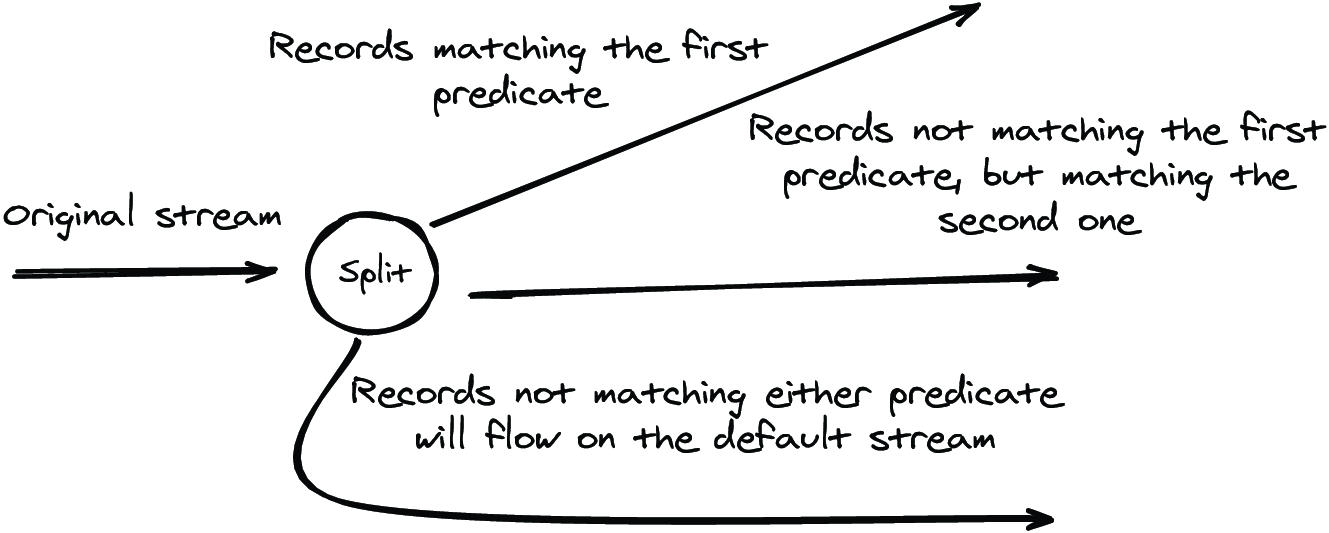
Visualizes the parent purchase stream dividing into branches for specific purchase types. section 6.6.2
