Stream time is a Kafka Streams processor’s current notion of time: the greatest record timestamp it has observed. It is not a separate timestamp type. Because processing is divided into tasks that own partition records, stream time is local to a task rather than a single global application clock. section 9.6 section 9.7
It advances only when processing encounters a higher timestamp. An out-of-order record is still processed, but it does not move stream time backward or change its current value. A custom processor can preserve that rule explicitly by retaining the larger of its saved stream-time value and each incoming record timestamp. section 9.6 section 10.3
Figure 9.36 Stream time represents the highest timestamp seen so far and is the current time of the application.
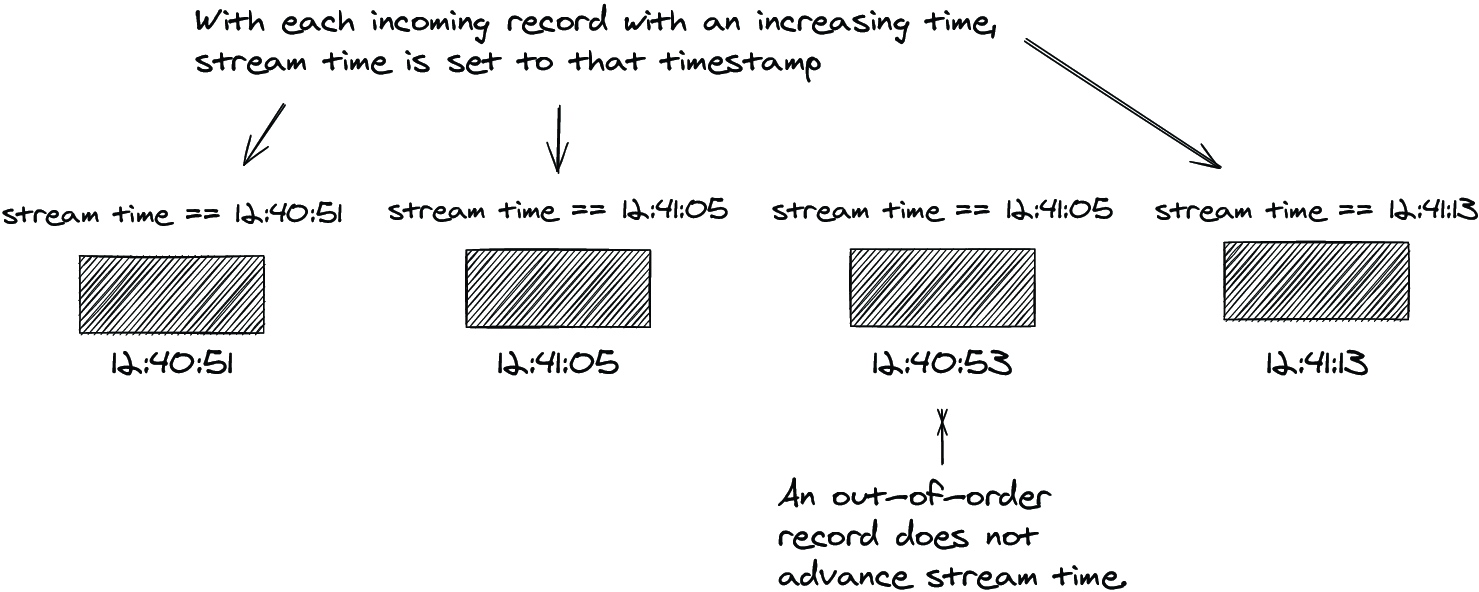
Use the timeline to see the key rule: the highest timestamp seen so far defines current stream time, while older records can still travel through the topology. section 9.6
Stream time matters wherever progress depends on event timestamps:
- Windowed operations advance and close only as stream time advances. A quiet or bursty source can therefore delay visible window results because no incoming timestamp has pushed time forward. section 9.6
- STREAM_TIME punctuation runs when record-driven timestamp progress makes a scheduled processor eligible. It is appropriate when work may wait for data; it is not a reliable real-time interval under sporadic input. section 10.2.2
- Timestamp extractors influence this behavior because they supply the timestamps that advance processing time. One invalid-timestamp strategy can use the current partition stream time. section 9.7 section 9.5
Drive a stream-time punctuator in a test
A stock-performance processor schedules punctuation every 10 seconds with STREAM_TIME. In a TopologyTestDriver test, pipe records with explicitly increasing timestamps—such as an initial timestamp, then timestamps 15 and 25 seconds later—to advance stream time and trigger the expected punctuation calls. Assert the resulting output count. Supplying a timestamp to pipeInput advances the driver’s tracked stream time; wall-clock punctuation instead requires advancing the driver’s wall clock. section 10.2.1 section 14.1.4
Choose stream-time scheduling when calculations should follow incoming data and delayed execution is acceptable. Choose wall-clock scheduling when an action must run regardless of data flow, while recognizing that wall-clock timing is best-effort and polling-cycle dependent. section 10.2.2
