The D3 strength() accessor controls how strongly a force pulls or pushes nodes in a force simulation. Positioning forces default to strength 1; lowering one makes its influence weaker relative to the others. section 12.4.1
For example, combine forceX(0) and forceY(0), then reduce the x-force strength to 0.01. Nodes are drawn toward the center much more strongly vertically, so they remain loosely spread along the x-axis. Lower the y-force instead to reverse the effect. strength() works with any D3 force. section 12.4.1
Use strength() to tune a layout’s visible behavior:
- Balance horizontal and vertical attraction to loosen a layout along one axis. section 12.4.1
- Adjust positioning forces while combining them with collision force to form layouts such as beeswarm charts. section 12.4.1
- Assign scale-derived target positions to positioning forces when creating distinct clusters. section 12.4.1
Figure 12.12 We can control the strength with which a force is applied with the strength() accessor function. By default, this strength is set to 1. If we apply both an x-force and a y-force but weaken the x-force, the attraction toward the coordinate (0,0) will be stronger vertically than horizontally. If we do the reverse, the attraction toward the center will be stronger horizontally than vertically.
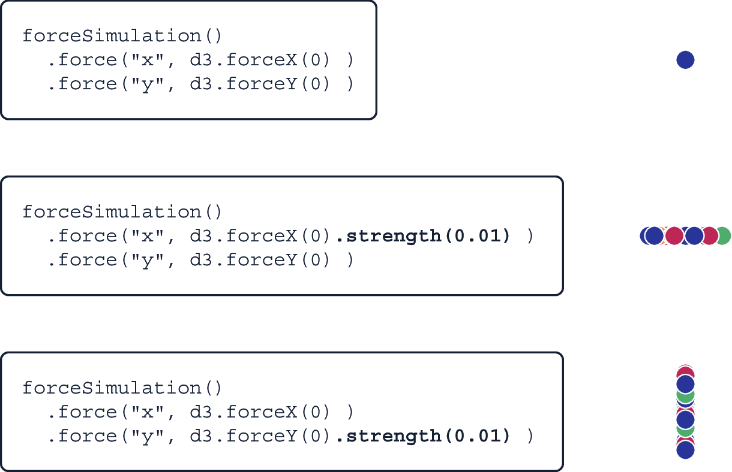
Compare weakened x- and y-forces to see how relative strength changes the direction in which nodes stay most tightly grouped. section 12.4.1
