liveBook · Manning

Submenu

As explained in WordPress Power Toolkit: Harness AI to build next-level websites

A submenu is a secondary navigation list containing options or pages subordinate to a main menu item.

A submenu is a secondary navigation list for pages or content that support a broader main-menu topic. It keeps the menu brief while helping visitors reach specific information with fewer clicks. section 3.3.5 section 3.3.1

Create a clear submenu in three practical steps:

  • Choose a short parent label for the broad topic, then place related pages beneath it as child pages. section 3.3.5
  • In WordPress, drag the child menu item slightly to the right and drop it beneath its parent until it becomes indented. section 3.6.2
  • If dragging is difficult, open the item’s menu module and select Move Under; then shorten the navigation labels and update the menu. section 3.6.2

Fishing-site menu

Use Lures as a parent menu item with Crankbaits, Spinnerbaits, Topwater lures, and Buzzbaits beneath it. Use About Us with Our History and Future Plans as child pages. section 3.3.1

Figure 3.20 To create a child menu (submenu) item, drag the child over one tab and drop it there.
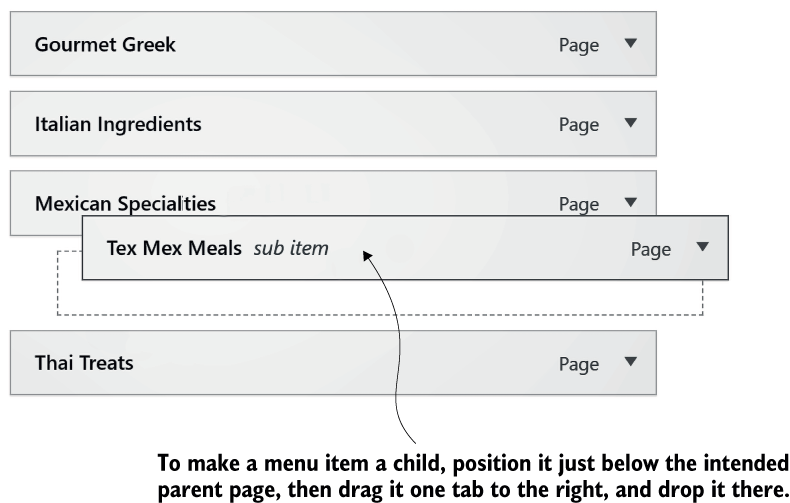
Use the figure to see the one-tab-right placement that turns a menu item into a child submenu item. section 3.6.2

How WordPress Power Toolkit: Harness AI to build next-level websites covers it

How deep it goes
Explains the parent-child relationship and gives WordPress nesting steps, but stops short of advanced navigation design.
Examples
Uses fishing categories and recipe menus to demonstrate parent topics, child pages, indentation, and short labels.
What it assumes
Assumes a site with parent and child pages, while explaining the hierarchy and menu nesting relationship.
What you can do after
Configure a WordPress submenu by nesting child items, renaming navigation labels, updating the menu, and checking the frontend.
How it connects
Connects submenus with parent pages, child pages, navigation labels, menus, and site navigation.

Related concepts

This explainer was generated by Manning's knowledge graph from the text of WordPress Power Toolkit: Harness AI to build next-level websites. The section links point to the parts of the book it draws on.