A supplicant is the client device requesting access to a network protected by 802.1X authentication. Until authentication succeeds, the protected port allows only 802.1X authentication traffic. section 11.4.3
Understand the supplicant’s role in the 802.1X exchange:
- The supplicant requests network access and provides credentials for verification. section 11.4.3
- The authenticator is the network device connecting the client to the network, such as a switch or access point. section 11.4.3 section 20.2.2
- The authentication server, usually a RADIUS server, verifies the supplicant’s credentials. section 11.4.3
- EAP defines authentication methods and message formats; EAPoL carries EAP messages between the supplicant and authenticator, while RADIUS relays them to the authentication server. section 20.2.2
Figure 20.7 EAPoL is used to transport EAP messages between the supplicant and authenticator, and RADIUS between the authenticator and AS.
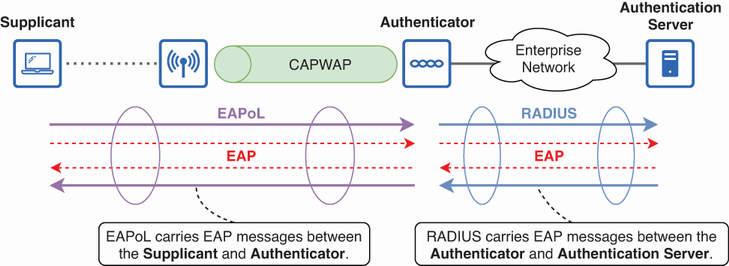
Trace how EAPoL carries messages between the supplicant and authenticator, and how RADIUS carries them between the authenticator and authentication server. section 20.2.2
