The deploy CLI moves a decorated workflow from Python source into running platform infrastructure. It imports the workflow file, discovers decorated functions, generates a Dockerfile with the SDK runtime server as its entrypoint, builds and pushes the container image, then registers the workflow and triggers deployment. section 9.8
A deployment coordinates several platform boundaries:
- Package the workflow into a container image, using a generated Dockerfile unless a custom Dockerfile is supplied. section 9.8
- Publish the image to a container registry and pass its reference in RegisterWorkflow. section 9.5.1
- Register workflow metadata including its name, API path, response mode, scaling settings, resource limits, and version. section 9.5.1
- Trigger deployment, check readiness and status, and support rollback when a deployment fails or degrades performance. section 9.5 section 9.8
Typical deployment
Running genai-platform deploy causes the CLI to discover the workflow definition, build and push its image, and call RegisterWorkflow. The Workflow Service then uses the recorded specification to create running containers, gateway routes, and scaling infrastructure. section 9.5.1 section 9.8
Figure 9.4 The three consumers of the Workflow Service contract. The deploy CLI connects to registry operations (RegisterWorkflow, UpdateWorkflow, DeleteWorkflow) and deployment operations (DeployWorkflow, RollbackWorkflow). The SDK's runtime server inside workflow containers connects to job operations (CreateJob, UpdateJobProgress, CompleteJob, SaveJobCheckpoint , FailJob). External clients connect to job operations (GetJobStatus, CancelJob) and optionally to deployment status (GetDeploymentStatus).
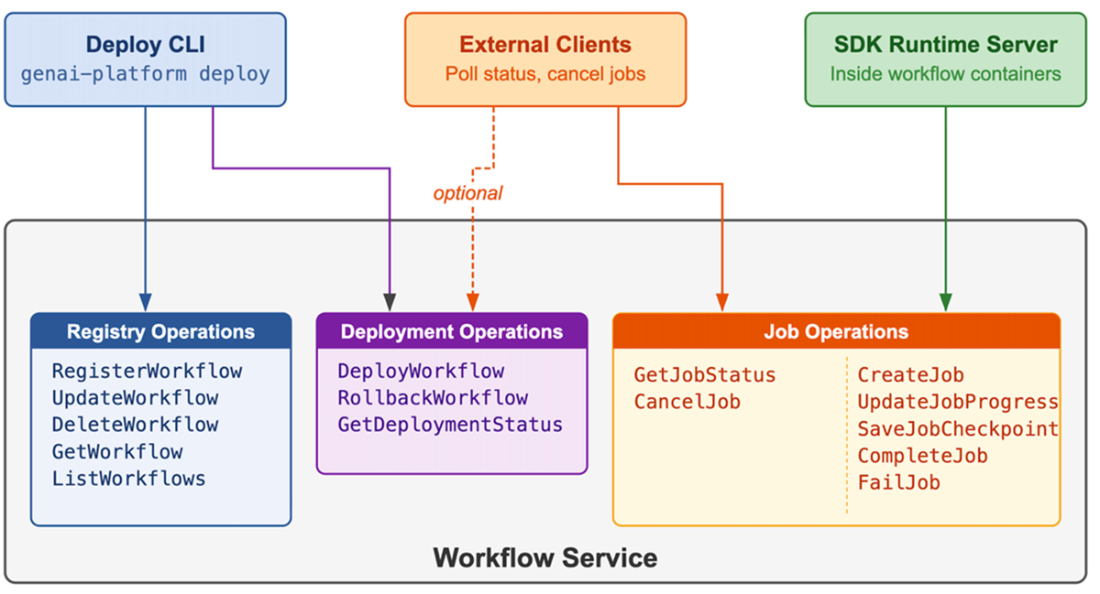
Trace the CLI's registry and deployment calls alongside the runtime server's job operations and external clients' status access. section 9.5
