SVG, or Scalable Vector Graphics, describes two-dimensional graphics as vector shapes rather than pixels. Because the browser renders geometry instead of a fixed raster image, SVG stays crisp when zoomed or shown at different resolutions. SVG elements also live directly in the DOM, so they can be styled, animated, inspected, manipulated, and made available to screen readers. section 1.2.2
An SVG element is a container with its own coordinate system. Shapes are placed with attributes: a line uses endpoint coordinates, a rectangle uses x, y, width, and height, and a circle uses a center point and radius. Content outside the container can be clipped, so container dimensions and positions matter. section 1.2.2
Build a responsive, maintainable graphic by combining these SVG features:
- Use viewBox to define an internal drawing area that can scale with its container. section 1.2.2
- Use line, rect, circle, ellipse, path, and text elements for visible marks and labels. section 1.2.2
- Set presentational attributes such as fill, stroke, stroke-width, rx, ry, and text-anchor to control appearance and alignment. section 1.2.2
- Group related elements with g and translate a group to establish a convenient local coordinate system. section 1.2.2
- Remember that SVG follows DOM order: later elements are painted over earlier ones. section 1.2.1
Create chart space with a margin group
A line chart can append an SVG container with a viewBox, calculate innerWidth and innerHeight by subtracting margins, then append a g element translated by the left and top margins. Marks inside that group use coordinates relative to the chart’s drawable area rather than the outer SVG edge. section 4.1.1
D3 commonly creates visualizations by appending SVG elements into the DOM, then setting their attributes and styles. A typical workflow selects a responsive container, appends svg, adds shapes such as rect, and maps data into positions, sizes, and colors. section 2.0 section 2.4
SVG is usually a strong choice for charts because individual marks remain DOM elements: CSS can style them, event listeners can support interaction, and browser tools can inspect and debug them. For very large element counts, complex animation, or complex gradients, Canvas may be preferable; a mixed SVG-Canvas rendering can combine both approaches. section 15.1 section 15.5
Figure 1.8 Gallery of fundamental SVG shapes that we’ll build in this section
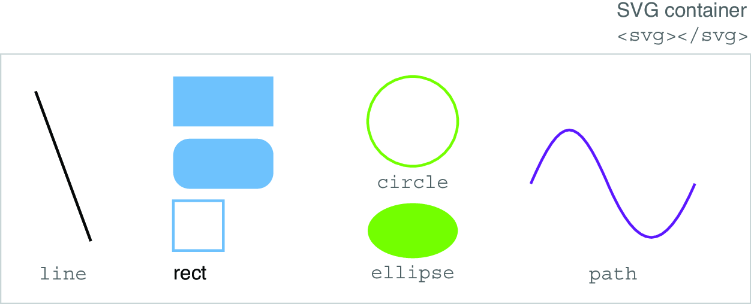
Use the shape gallery as a visual checklist for the core elements and their distinct geometry. section 1.2.2

