An SVG element is a structured graphical element that helps create vector artwork. A responsive loading screen can be built from eleven rectangles inside an inline SVG, with each rectangle positioned and styled independently. section 3.1 section 3.2.1
Work with SVG elements by treating them as shapes on a coordinate grid:
- Start at the origin, (0,0), in the SVG document’s top-left corner. section 3.2.1
- Increase x to move farther right and y to move farther down. section 3.2.1
- Account for each rectangle’s width and the gaps between rectangles when laying out a loader. section 3.2.1
- Apply styles inline, in a style element, or through a separate stylesheet when the SVG is inline in HTML. section 3.3
Coloring loader rectangles
An SVG rectangle can receive a presentation attribute directly, such as <rect fill="blue">. The same property can be selected from CSS, for example: rect { fill: blue; }. A sequence of rectangle selectors can give each loader bar a different fill color. section 3.3

Use the goal figure to connect SVG rectangles, progress feedback, and the finished responsive loader. section 3.1
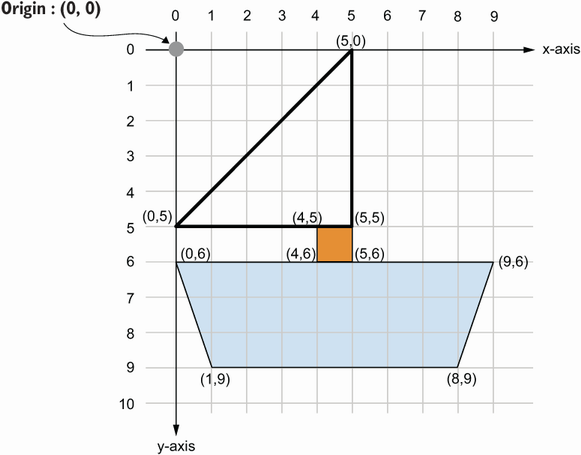
Use the coordinate-plane figure to plan each SVG element’s position from the origin. section 3.2.1

